
SMS works best when it’s connected to the wider customer journey, not treated as a separate broadcast channel. A Klaviyo SMS marketing integration brings customer profiles, ecommerce activity, email flows, and order updates into a coordinated system. For Hong Kong businesses selling locally and overseas, that connection helps make each message more relevant to what a customer has browsed, bought, or needs to know.
SMS can make customer communication timely, but its impact depends on how well it works with your store and email marketing. This article explains how a Klaviyo SMS marketing integration connects customer profiles, ecommerce platforms, and automated flows, including order and shipping updates.
You’ll also learn what to consider when planning the integration, how to align SMS with your brand and customer experience, and where email and text messages serve different roles. The aim is a connected marketing system that can support growth across Hong Kong and international markets.
Key Takeaways
- See how connected customer profiles can help coordinate SMS and email around customer activity.
- Understand how ecommerce platform connections shape the data and events available for marketing flows.
- Learn how to give email and SMS distinct roles while keeping the customer experience consistent.
- Explore how order and shipping messages can support clearer communication after checkout.
- Follow the key setup considerations for connecting Klaviyo SMS to your store and building a more joined-up marketing system.
Cross-channel customer profiles and marketing flows
Customer profiles connect SMS activity with email engagement, store behaviour, and purchase history. This shared context helps each flow respond to a customer’s relationship with your business.
Real-Time Data Syncing
A Klaviyo SMS marketing integration can connect customer, product, and order events from an ecommerce platform to marketing flows. When a shopper places an order, that event can update their profile and inform follow-up messages. Product activity can also shape which items appear in a campaign. For Hong Kong stores serving overseas buyers, accurate event and product data supports more relevant communication across markets.
Customer Attributes and Message Context
Customer attributes add useful context: a preferred product category, recent order, or VIP status can help determine a message’s content. For example, a skincare store might send a replenishment message to someone who bought cleanser instead of a general product announcement. Build segments around attributes that support a clear decision, then align each message with the customer’s activity and relationship stage.
Profiles also help coordinate email and SMS flows. A recent buyer may need a post-purchase email, while a time-sensitive update may suit a text. Define the flow trigger, audience conditions, and message purpose before writing copy. Then review how overlapping flows handle the same person, so email and SMS don’t repeat the same offer.
VIP offers work best when eligibility reflects meaningful customer behaviour. A retailer could define a VIP segment using repeat purchases or engagement, then send early access to a product launch. Keep the offer aligned with the brand’s positioning and inventory. Profile-based targeting makes the invitation more relevant than sending the same promotion to every subscriber.
Re-engagement flows can use inactivity as a signal to change the conversation. For example, a Hong Kong homeware store might send a returning-customer message featuring a complementary item after a previous purchase. Use the profile to distinguish a past buyer from someone who browsed but never ordered. That distinction lets the message address a real customer context, not assume every inactive contact has the same reason.
There is a commercial case for joined-up flows: Coffee Beanery’s use of consolidated email and SMS automations contributed to 12% year-over-year growth in flow revenue in Q4 2024. Treat that result as an example, not a forecast. Map each flow to a specific event, audience, and purpose, then assess whether the messages serve the customer journey.
Audience preferences can guide channel choice and cadence. Klaviyo reports that 74% of consumers subscribe to SMS messages from two to five brands, while in North America, 30% of people say SMS is their most preferred channel of communication from brands. In Klaviyo’s latest SMS consumer report, 77% of North American shoppers said brands should send at least one text message a week, and 50% said brands should send more than one text message a week.
Not every update needs to arrive by text: Klaviyo reports that 54% of North American consumers prefer to receive order confirmations by email. When assessing data security for customer profiles and connected flows, look for SOC 2 or ISO 27001 certifications.
Ecommerce and other platform integrations
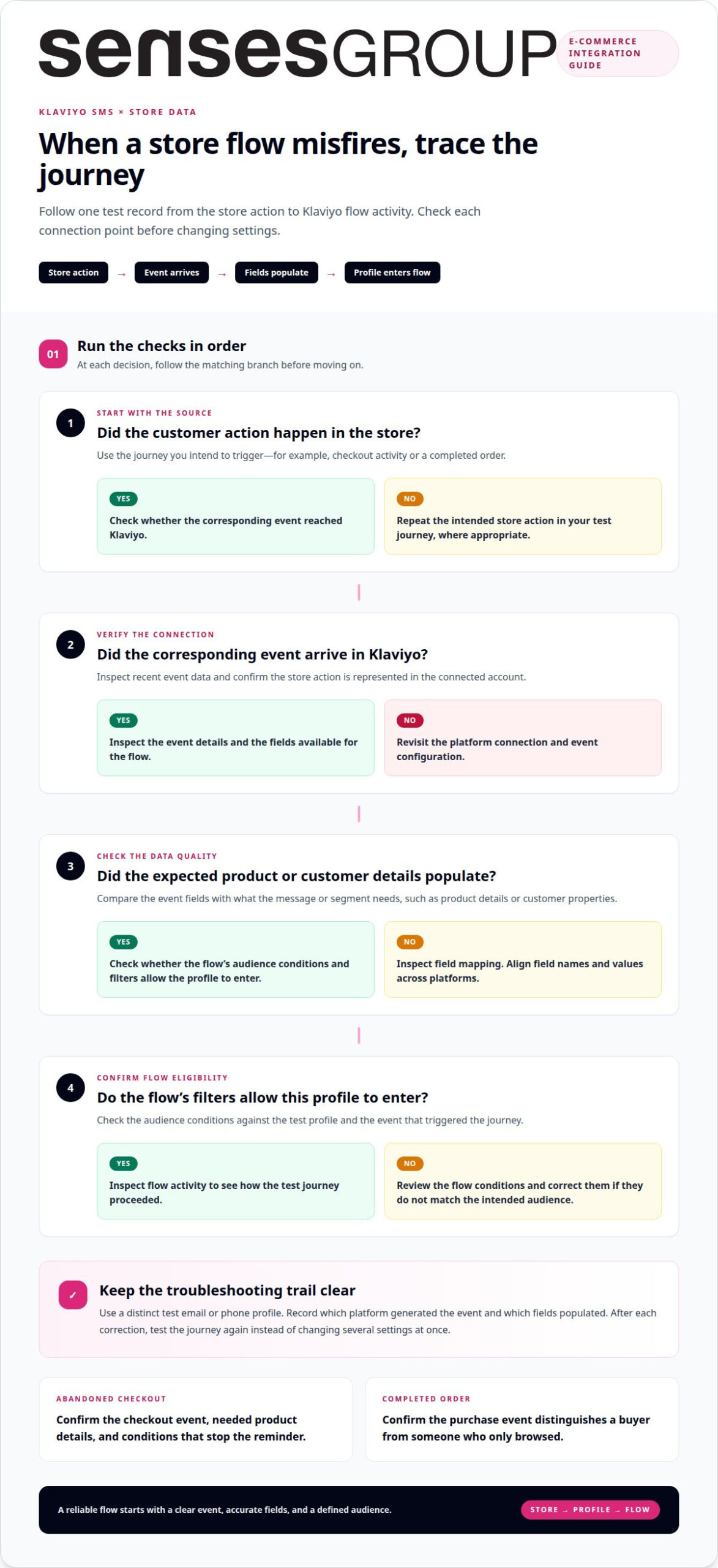
Common integration issues include missing events, mismatched fields, and unconnected customer records. Troubleshoot by checking the platform connection, reviewing recent event data, and testing a sample journey from checkout through message triggering.
For a Hong Kong ecommerce business, the store is the operational source of product and order activity. A platform connection carries relevant information into Klaviyo, where it can support segments and automated messages. Shopify is one example of a store platform; the useful question is whether the events your marketing depends on appear consistently in the connected account.
Start by mapping the intended journey. For an abandoned-checkout flow, identify the event that represents checkout activity, the product details needed in the message, and the conditions that should stop the reminder. For a completed-order flow, confirm that a purchase event distinguishes a buyer from someone who only browsed. Clear event definitions prevent messages from firing at the wrong stage.
Field mapping matters when a store uses custom product names, categories, or customer properties. If a Hong Kong retailer labels a product category differently across systems, its segments may miss those shoppers. Compare the fields used by each platform, then align naming and values before building filters. A clean mapping supports accurate segmentation for local collections and overseas product ranges.
Other integrations can add context, but each needs a defined role. A support platform might inform service follow-up, while a review platform could identify customers eligible for a feedback request. WhatsApp is a separate messaging channel, not simply a substitute for SMS. Plan its role independently to avoid duplicate prompts across channels.
When data appears incomplete, trace one test record rather than changing several settings at once. Check whether the action occurred in the store, whether the corresponding event reached Klaviyo, and whether the flow’s filters allow that profile to enter. If the event arrives without expected details, inspect field mapping. If no event arrives, revisit the connection and event configuration.
For an inconsistent integration, test the journey again after each correction. Use a distinct test email or phone profile, place a test order where appropriate, and inspect the resulting event and flow activity. Record which platform generated the event and which fields populated. This creates a practical troubleshooting trail instead of relying on assumptions.
Before expanding into another market, review the journey with its localised product catalogue and customer data. A Shopify store integration plan can help structure this platform work around the customer experience.
Klaviyo says its platform and Help Center are available in 12 languages. For teams working across different language preferences, this may make platform guidance easier to consult. Still, choose one shared set of event names, field definitions, and test cases for the integration, so checks remain consistent regardless of the language used to review them. Keep the decision trail with the platform connection and sample journey, then confirm that the same event and profile behavior appears after a change. This keeps language access as a support for troubleshooting rather than a substitute for validating the data path.
Email and SMS channel features
Email and SMS serve different roles, even when they share customer data. Choose each channel according to the message’s urgency, content, and customer preference.
Consent and Opt-In Rules
Before adding a customer to an SMS list, obtain explicit consent and retain a record of the signup source. A Hong Kong skincare store, for example, can separate SMS permission from email signup, then use that permission when selecting campaign recipients. Make opt-out handling clear, and suppress anyone who withdraws consent from future promotional messages.
Consent builds trust; it is more than a form field. Review the wording at each signup point, including checkout and landing pages, so customers understand they are opting into texts. For campaigns aimed at overseas buyers, account for the destination market’s requirements separately rather than assuming one consent approach fits every country.
Automations, Campaigns, and Segmentation
Automations send messages in response to customer actions, while campaigns are planned sends to a selected audience. For example, an abandoned-cart automation can respond to checkout activity, while a launch campaign can target customers interested in a product category. Segmentation defines who qualifies, using attributes or behaviour such as purchase history and engagement.
Plan each message around one purpose and one trigger. A welcome flow can introduce the brand, while a campaign can announce a seasonal collection. Klaviyo’s research reports that 72% of consumers globally are interested in receiving weekly texts from brands. That figure is context, not a reason to send on a fixed schedule; relevance and audience response should guide cadence.
Risks, Deliverability, and Best Practices
SMS creates a direct interruption, so excessive or poorly timed messages can weaken trust and prompt opt-outs. Keep copy concise, identify the brand clearly, and make the next step obvious. Klaviyo reports a 98% SMS open rate, but an opened message doesn’t guarantee a click, purchase, or positive customer experience.
For better delivery, use permission-based lists, maintain accurate phone details, and exclude opted-out profiles. Test links and personalisation before sending a campaign. If delivery or engagement falls, review the audience, message timing, and destination links before increasing volume. This helps distinguish a data issue from weak campaign relevance.
Comparing Klaviyo SMS with Postscript, Attentive, or another platform means assessing fit rather than assuming one is universally better. Compare ecommerce connections, segmentation, automation, reporting, and the channel setup your team needs; no comparative performance figures are available here.
Klaviyo’s SMS availability is described as covering over 20 countries, but that alone doesn’t establish support for Hong Kong phone numbers or every local carrier. Confirm destination and number-type support within the platform before designing a Hong Kong send strategy.
Hong Kong message charges and plan limits depend on the account’s available plan, destination, and SMS usage. Build a forecast from the intended audience and message frequency, then review the applicable account terms; no Hong Kong-specific rate or limit is stated here.
Order and shipping updates
Order and delivery messages can reduce uncertainty after checkout. For a Hong Kong ecommerce store, connect each message to a clear order event and accurate fulfilment information.
Separate the journey into meaningful stages: order received, order prepared, dispatched, and delivered. A confirmation should reflect a completed purchase, while a shipping update should follow a dispatch event. If an order is cancelled or its status changes, the flow should avoid sending an outdated message. Clear triggers keep customer communication consistent with store records.
Before building the flow, map the information available at each stage. An order confirmation may need the order reference and items purchased. A dispatch message may need the carrier name or tracking link, if the fulfilment system supplies them. Avoid promising a delivery date unless the underlying order data supports it. Accurate details matter more than sending extra messages.
Klaviyo reports that 29% of North American consumers are keen to receive order confirmation texts, while 38% are keen to receive shipping and delivery confirmations. These figures describe North American consumers, not Hong Kong shoppers. They indicate interest in useful updates, but don’t establish a preferred channel for every local customer.
For Hong Kong orders, keep the language and timing aligned with the customer’s selected market and delivery information. A local buyer receiving a parcel within Hong Kong may need a concise dispatch update. An overseas customer may benefit from clearer wording about the next delivery stage. Keep dates and status descriptions tied to reliable order events rather than assumptions.
Review how email and SMS divide the work. Email can carry a fuller receipt or detailed order summary, while a text can highlight a timely dispatch change. For example, send the email confirmation after checkout, then use SMS for a material delivery-status update. Avoid repeating identical content across both channels, which can make routine notifications feel intrusive.
Test the full sequence with sample orders before activation. Check that a paid order triggers the correct confirmation, a dispatch event produces the intended update, and a cancelled order doesn’t continue through the sequence. Inspect message links and personalisation fields, too. A wrong order reference or broken tracking link undermines trust even when the trigger works correctly.
Measure each stage separately after launch. Compare sent, delivered, clicked, and customer-support outcomes for order confirmations and shipping updates. If customers ask where parcels are despite receiving a dispatch message, review its timing and content. If a message arrives before fulfilment information is ready, adjust the trigger to match the actual store or shipping event.
How do I set up Klaviyo SMS and connect it to my store?
A reliable setup starts with the store data and customer journey, not message copy. For a Hong Kong Shopify business, define the events and customer actions that should trigger each SMS before activating flows.
- Map the customer journey. List the moments where a text adds useful value, such as an abandoned checkout, a product back in stock, or a post-purchase update. For each moment, define the intended audience, trigger, and message purpose. This prevents promotional texts from being confused with service updates.
- Connect the ecommerce platform. Link the store to the Klaviyo account through its available integration process. Then review whether customer profiles, product details, and order events appear as expected. A Shopify order, for example, should connect to the correct customer and purchased items before it can support a relevant follow-up.
- Review the data structure. Identify the fields needed for segments and personalisation, such as product category, order status, or customer location. Align custom field names with the values used in the store. If a Hong Kong catalogue uses different category labels from an overseas storefront, consistent mapping helps prevent profiles from entering the wrong audience.
- Configure SMS permissions. Connect signup points to the correct subscriber records, and preserve the source of each permission. Keep SMS consent distinct from email preferences. Apply exclusions for people who have opted out, so an eligible email profile does not automatically become an SMS recipient.
- Build flows and campaigns. Set the event that starts each automation, its audience conditions, and the message sequence. For example, a checkout reminder should depend on checkout activity and exclude customers who later completed that order. A product launch campaign should target relevant subscribers rather than the entire database.
- Test before activation. Use a test profile and sample order to trace the journey from store event to message. Confirm that the correct data populates, exclusions work, and links lead to the intended product or page. Review the customer experience on a mobile device before switching on the flow.
After launch, review flow activity and campaign results together. If an order event fails to trigger, trace the event and profile first. If a message reaches the wrong segment, inspect its conditions and mapped fields. Correct the source issue before changing the copy or increasing send volume.
For a connected Shopify storefront and Klaviyo automation plan, discuss your ecommerce integration setup.
Senses Group: Klaviyo Email Automation
Senses Group is a natural next step when your ecommerce store, customer data, and messaging need to work as one system. Klaviyo Email Automation can structure email journeys around customer actions and support a coordinated experience across email and SMS.
Turn to Senses Group when disconnected flows, unclear audience segments, or inconsistent brand messages make it harder to scale in Hong Kong and overseas. Brand Strategy and Brand Identity Design can strengthen the foundation behind your customer communications, while SEO & AI Engine Optimisation supports discoverability as your business grows across markets.
Contact Senses Group to discuss how Klaviyo Email Automation can support your ecommerce marketing.
Build a stronger customer journey from here
Make your next step a deliberate one: decide how SMS should strengthen the customer experience as your ecommerce business grows across Hong Kong and overseas. A Klaviyo SMS marketing integration is most valuable when it fits a clear brand position, a well-structured store, and communication that feels consistent at every customer touchpoint.
Senses Group can help establish that foundation through Brand Strategy, Brand Identity Design, and an Ecommerce Shopify Store. These capabilities support decisions across your customer journey, from how the business is positioned to how the storefront presents it. With that groundwork in place, your marketing can develop as a connected system rather than a collection of separate messages and campaigns.
Consider where your current store and customer communications create friction, then choose the next improvement with purpose. Contact Senses Group to discuss the direction for your ecommerce experience and marketing. A clearer foundation can help your business move forward with focus.
Frequently Asked Questions
Klaviyo SMS Marketing: what is it and how do you use it?
Klaviyo SMS marketing lets an ecommerce business send text messages to subscribed customers using customer and store information. Use it for a defined purpose, such as announcing a product launch to interested subscribers or sharing a time-sensitive update. For example, a fashion retailer could target customers who previously bought from a particular category. Keep the message relevant, identify the business clearly, and respect each subscriber’s communication preferences.
Which platforms and tools integrate with Klaviyo SMS?
Klaviyo SMS can work with an ecommerce platform such as Shopify, using store activity and customer information to support marketing communication. Other connected tools can add useful context, such as customer support activity or product reviews. For each connection, consider what information it passes, how you’ll use that data, and whether it improves a specific customer interaction. Avoid adding tools without a clear role in the marketing system.