
Stock control is not just a back-office task: it shapes the promise a business makes to every customer. Shopify inventory management solutions help merchants track products by SKU and variant, while effective inventory management connects stock receiving, order processing, sales-channel updates and retail availability.
For Hong Kong SMEs, that connection matters as a business grows from local online sales into physical retail or overseas markets. A stock record is only useful when the team can act on it: receive incoming products accurately, fulfil orders at busy periods and avoid selling items that aren’t available.
This guide explains inventory management and how Shopify supports it. It covers receiving stock and supplier orders, preparing for peak demand, synchronising inventory across sales channels and managing retail stock with Shopify POS. Each part contributes to a more dependable operation.
Key Takeaways
- Use SKU and variant-level records to keep stock counts clear as your product range grows.
- Connect inventory workflows with relevant shipping, accounting, warehouse and POS systems to reduce manual handoffs.
- Build supplier lead times and sales patterns into reorder decisions so stock arrives when it is needed.
- Plan peak-period order handling around fulfilment capacity, not just projected sales.
- Keep online and retail stock aligned by updating inventory for sales, transfers, returns and restocks.
1. What is inventory management?
Inventory management keeps product records, physical stock and customer orders aligned. In Shopify, merchants can track inventory by SKU and individual product variant. A blue medium shirt and a red large shirt therefore need distinct records and counts. Each sale, return, restock or transfer should update inventory levels, so the available quantity reflects what can actually be sold. These controls matter when a Hong Kong business serves both local shoppers and overseas customers.
A SKU, or stock keeping unit, is an internal identifier for a specific product or variant. A consistent SKU system helps staff match an item in Shopify with the same item in a warehouse, retail store, shipping workflow or accounting record. For example, the SKU for a particular size and colour should remain consistent across connected systems. Clear identifiers support reliable searches, stock counts and sales reports, while inconsistent naming makes records harder to reconcile.
Shopify reports are more useful when product records are structured consistently. Merchants can use SKU-level information to review which variants sell, where stock is held and which items need attention. This supports practical decisions, such as replenishing a fast-selling size while avoiding unnecessary orders for slower variants. Set a clear SKU convention before adding products, then apply it consistently to new items and updates. Reports can guide decisions only when product data is organised.
Connections extend inventory management beyond the online store. Shipping integrations can pass order details into fulfilment workflows; accounting integrations can help align sales records; and POS systems connect retail transactions with stock records. A warehouse management system, or WMS, can coordinate warehouse tasks such as picking and dispatch. Third-party logistics providers, or 3PLs, handle fulfilment for a business, while an integration can help share order and inventory data with them. Each connection should have a defined role and a clear direction for updates.
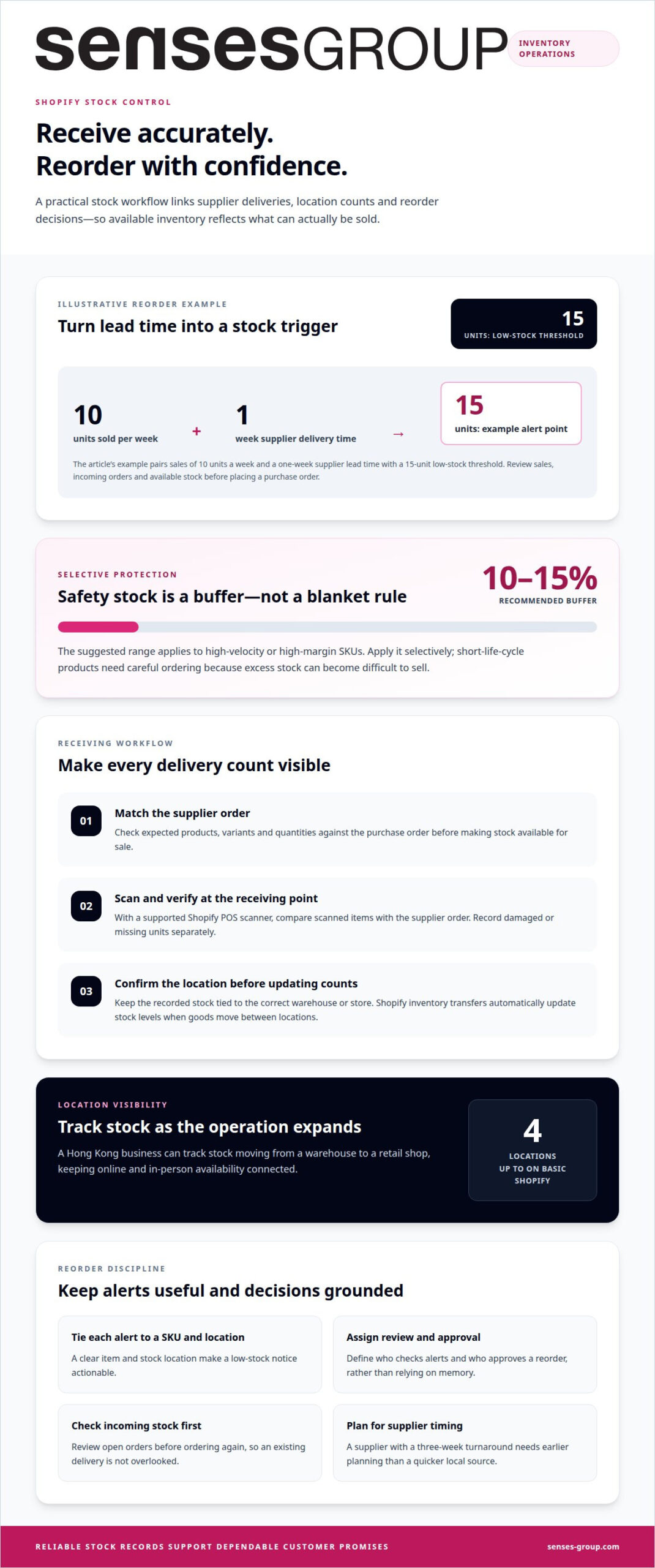
Shopify’s built-in tools may suit a business that needs straightforward product tracking and order updates. Shopify supports inventory management across locations, and Basic Shopify permits tracking at up to 4 locations. As workflows become more complex, apps can add functions or connect external systems. An enterprise resource planning system, or ERP, brings business processes such as purchasing, finance and operations together. ERP integration with Shopify can pass product, order and stock data between platforms, but mismatched SKUs or duplicate records can undermine the connection.
Choose a management system based on the work it must coordinate, not its feature count. Map how an online order moves from purchase to dispatch, then identify where shipping, accounting, WMS, 3PL and POS data must update. Keep Shopify as the central inventory record only when connected tools reliably return relevant changes. If different systems each hold separate counts, assign ownership for updates and reconciliation.
How much do Shopify inventory management solutions cost? Shopify’s native inventory tools may cover basic tracking, while apps and ERP connections can add subscription or integration costs. Pricing depends on the selected tools, required workflows, connected systems and project scope, and is provided after a quote request.
2. Receiving stock and supplier orders through POS
Accurate receiving starts before a supplier delivery reaches the warehouse. Match each purchase order to the expected products, variants and quantities, then record discrepancies before making stock available for sale. This distinguishes ordered stock from physically received stock, which matters when online and retail orders draw from the same inventory.
At the receiving point, staff can scan product barcodes with a supported Shopify POS scanner, compare scanned items with the supplier order and record damaged or missing units separately. Confirm the receiving location before updating counts. Shopify inventory transfers automatically update stock levels when goods move between locations, helping a Hong Kong store track stock shifting from a warehouse to a retail shop.
Reorder thresholds turn supplier lead times into practical alerts. For example, a store selling 10 units per week with a supplier delivery time of one week can use a 15-unit low-stock threshold. A supplier with a three-week turnaround needs earlier planning than a local source with quicker delivery. Review sales, incoming orders and available stock together before placing a purchase order.
Safety stock provides a buffer against demand changes or delivery delays. A recommended buffer is 10%–15% for high-velocity or high-margin SKUs. Apply it selectively rather than adding the same reserve to every product. Items with short life cycles need careful ordering because excess stock can become difficult to sell. A reorder workflow can notify the responsible person when a SKU reaches its threshold, then prompt a review of supplier timing and open orders.
Inventory apps or connected workflows can provide low-stock alerts and reduce reliance on memory. Tie each alert to a specific SKU and location, and define who reviews it and approves a reorder. This keeps alerts useful rather than noisy. Before placing another supplier order, check whether the proposed order already includes incoming stock.
Not every business model physically holds every product. Shopify supports inventory tracking for dropshipping and pre-orders, as well as in-person sales and other order types. With dropshipping, the supplier fulfils the product, so the store’s workflow must still reflect stock availability accurately. A pre-order requires clear records of incoming quantities and expected fulfilment. Neither model removes the need to coordinate product availability with customer orders.
For warehouse operations, define each location and transfer step in Shopify before moving goods. Record dispatch from the sending location and receipt at the destination, then investigate any count mismatch before selling the transferred stock. Where stock alerts also shape customer messaging, Klaviyo Email Automation can fit into a broader communication workflow.
Order processing capacity during peak periods
Peak-season demand can increase sales volume by 200%–300%, so fulfilment capacity must be planned alongside promotions. For a Hong Kong Shopify store, estimate demand by product and variant, then compare the forecast with available stock, packing capacity and delivery arrangements. A campaign can generate orders faster than a team can pick and dispatch them. Tracking these limits helps merchants set realistic fulfilment priorities before a surge begins.
Inventory distribution affects both delivery speed and warehouse workload. Positioning stock closer to the customers it serves can reduce delivery time and shipping costs. A merchant selling locally and overseas can use Shopify’s multiple-location inventory records to understand where available units sit. Allocate stock using expected demand and fulfilment needs, then leave enough capacity at each location for routine orders. A system designed for one store and 100 SKUs may not suit 10 stores and 10,000 SKUs.
Forecasting should connect campaign plans with purchase orders and incoming inventory. Review past sales patterns, planned promotions, supplier lead times and open orders together. If a product is expected to sell quickly, place the purchase order early enough for stock to arrive before the campaign. Do not count stock already committed to orders as available inventory. This keeps forecasts grounded in units that can actually be fulfilled.
For Shopify Plus merchants, purchase orders still need to fit the wider inventory workflow. Keep each order linked to clear product identifiers, quantities, supplier details and expected delivery timing in the system used to manage purchasing. Reconcile received quantities against the order before making new stock available. If purchasing happens in an ERP or another inventory system, define which platform owns each update and how changes reach Shopify. This helps prevent duplicate orders and conflicting records during a busy period.
Transfers can balance stock between a warehouse and retail locations when demand shifts. Record the transfer from its sending location, track units in transit and update the destination when goods arrive. Shopify inventory transfers update stock levels when inventory moves between locations. A clear handover matters during peak periods, when staff might otherwise sell units already allocated elsewhere. Nearby fulfilment locations can also help process orders more efficiently.
Which Shopify inventory solutions support Hong Kong businesses, HKD, and local fulfilment? Shopify’s native inventory tools support multiple locations; connected apps and ERP systems can extend workflows. Choose a setup whose inventory records, HKD reporting and local fulfilment process work together, and test how orders, transfers and incoming stock update across platforms.
Prepare a peak-period workflow before a promotion begins: confirm stock allocation, purchase-order timing, transfer responsibilities and order-processing capacity. This makes inventory tracking actionable. When a Shopify store connects forecasting to fulfilment operations, merchants can respond to demand with a plan rather than relying on last-minute stock decisions.
4. Real-time inventory synchronisation across sales channels
Each sales channel creates another place where stock can change. Shopify can manage inventory across multiple locations, while connected sales platforms may need apps or manual updates to share availability. A Shopify store selling online, through Shopify POS and on marketplaces needs a defined source of truth. Otherwise, a sale in one channel can leave another showing stock that is no longer available.
Shopify’s Locations feature launched in September 2018 to track inventory across warehouses, stores and dropshipping companies. For a Hong Kong retailer, assign stock to the location that physically holds it, then make each location’s role clear. A store may fulfil local orders, while a warehouse handles online dispatch. Shopify POS inventory records can connect retail sales with online stock, provided each transaction updates the correct item and location.
SKU consistency is the foundation of channel synchronisation. Use the same SKU for the same product variant in Shopify and each connected platform. Then map which locations can fulfil each channel and whether a channel can access all stock or only an allocated amount. This structure improves visibility for businesses managing retail, online and marketplace sales.
External marketplaces may rely on third-party apps, manual triggers or batch updates. These methods can delay stock updates, and marketplace inventory may not appear correctly or promptly in Shopify. A product sold twice in quick succession across separate channels can therefore be oversold if both systems use outdated counts. What inventory management risks should Shopify merchants consider, including overselling and sync delays? Key risks include stale data, inconsistent SKUs, delayed updates and unclear location ownership, any of which can show customers stock that is unavailable.
To reduce that risk, choose software that synchronises stock frequently or uses webhooks to send updates when events occur. Test the full process: sell an item in Shopify POS and confirm the online count changes, then test a marketplace sale and a return. Record which system owns each update. A sync connection is useful only when errors are visible and staff know how to resolve them.
Shopify inventory can be synced across social channels and marketplaces, including TikTok, YouTube, Facebook, Instagram, Amazon, Target, Walmart and eBay. Connecting these channels does not mean every setup updates identically. Review the connected app’s update method, location mapping and return handling before relying on it for accurate availability.
Third-party logistics partners add another location and another inventory handoff. Align the partner’s stock records with Shopify’s location structure, then reconcile dispatched, returned and damaged units. For stores and warehouses, define when stock becomes sellable: at receipt, after inspection or after a system update. Clear rules make inventory visibility more useful as a business expands into new channels.
Real-time synchronisation is an operating process, not just a software setting. Keep product identifiers consistent, define location ownership, test updates across each channel and review exceptions. These steps connect Shopify POS, online sales, marketplaces and fulfilment partners without treating every stock count as an isolated record.
5. Retail inventory management with Shopify POS
Retail stock has to reflect what is physically available, not just what a system expects. Shopify inventory records can distinguish stock on hand, damaged, reserved, committed to orders and incoming across locations. That view helps a Hong Kong shop avoid selling an item already committed to an online order. Review sales reports covering the past 6 to 12 months to identify product and seasonal trends before deciding what to reorder.
At the point of sale, Shopify POS can connect an in-store transaction with inventory records. Its native support for 1D and 2D barcode scanners helps staff identify products during selling and stock counts. Scan the item, confirm the variant and location, then record the transaction in the correct workflow. The system can update stock automatically for sales, transfers, returns and restocks, reducing the gap between retail activity and online availability.
Accurate counts still need a routine. Instead of relying only on a full physical count, a shop can cycle-count a focused group, such as its top 20 bestsellers weekly. A full count can interrupt business for a day, while regular smaller counts help expose discrepancies earlier. Depending on the industry, count stock at least once a quarter, and investigate differences between physical units and Shopify records before adjusting quantities.
Returns require a separate decision from the moment an item comes back. Shopify records should distinguish returned stock from sellable stock, with returns separated from available inventory within 24 hours. Inspect each item, then record whether it is ready to sell, damaged or otherwise unavailable. This step prevents a returned product from appearing as available before staff have assessed its condition.
Multi-channel retail adds another layer. A product sold in a shop, through Shopify’s online store and on Amazon needs consistent product records and location assignments. A mismatch can leave a customer seeing stock that the shop has already sold. Set clear rules for where each product is held, which location fulfils online orders and how transfers are recorded. For each store, distinguish stock available for walk-in sales from units reserved for other orders.
Retail inventory management is also a commercial decision. Use sales trends and count results to identify which products need replenishment, which move slowly and where stock is tied up. A reorder decision should reflect both actual counts and committed units, rather than the headline quantity alone. For a connected customer experience, build a Shopify retail store around the products, channels and buying journey your business needs.
Senses Group: Ecommerce Shopify Store
Senses Group helps Hong Kong businesses build an ecommerce foundation through Shopify store development, with brand strategy and identity shaping how the business presents itself across markets. Turn to this support when your current store no longer reflects your product range, retail experience or plans to reach customers overseas.
A store is more than a place to display products. Its structure, brand presentation and customer communications need to work together as the business grows. Klaviyo Email Automation supports customer communication, while clear brand strategy and identity create a consistent experience across the storefront and marketing touchpoints. Together, they connect product discovery with purchase and ongoing engagement.
If you’re planning a Shopify store or refining your ecommerce direction, contact Senses Group to discuss your business needs.
Build a stronger foundation for your next stage
As your business expands, inventory decisions become part of the customer experience. The next step is to shape a commerce system that supports the way your brand wants to grow, whether that means serving Hong Kong shoppers more effectively or entering overseas markets. The right Shopify inventory management solutions should fit that direction, not force your business into disconnected processes.
Senses Group brings Brand Strategy and Brand Identity Design together with Ecommerce Shopify Store development, helping align how your business looks with how customers shop. This strategic foundation supports a coherent experience as your product range and sales channels evolve.
Contact Senses Group to discuss your needs. A considered next step can turn operational clarity into a more confident path for growth.
Frequently Asked Questions
What is inventory management?
Inventory management is the process of deciding what stock a business has, where it is held and how it moves through sales and replenishment. For example, a retailer can distinguish a sellable item from one reserved for an order or awaiting inspection. These categories help teams make decisions from operational records rather than assumptions, and connect purchasing priorities with customer demand.
What are the best Shopify inventory management apps in 2026?
The best option in 2026 is the one that addresses a specific workflow gap without adding unnecessary complexity. Shopify’s App Store contains over 16,000 apps, so narrow the choice by need: barcode-based warehouse work, purchasing control, or connections to other business systems. Start with Shopify’s built-in tools when they fit; consider an app or ERP when a clearly defined requirement calls for it.
How do Shopify inventory management apps compare on features and ease of use?
Compare apps by the work they support, the data they change and the effort required to maintain them. A focused tool may suit one task, such as purchase-order tracking, while a broader system may coordinate inventory with purchasing or warehouse workflows. Ease of use depends on how closely its process matches staff routines. Test a representative product and order before applying the workflow across your catalogue.
How can I sync inventory across Shopify, marketplaces, and retail stores?
Use consistent product identifiers and define the inventory source of truth, then connect marketplaces and retail locations through Shopify-compatible integrations. Test a sale, return and stock adjustment in each channel to see whether quantities and location records update as intended. Before enabling an integration, review app permissions, protect credentials and limit staff access to what they need. Grant only the permissions needed, then remove app access when the work is complete.