
A polished storefront can still lose a sale at checkout. Shopify checkout customization shapes the final step of the buying journey, where customers review their details, choose payment and delivery options, and decide whether to place an order. The aim is not to add features for their own sake, but to remove friction while maintaining confidence.
For Hong Kong SMEs selling locally or expanding overseas, checkout needs to make the next steps clear. Buyers should be able to understand what they’re paying, how delivery works, and what happens after they place an order. If checkout feels confusing or disconnected from the brand experience that came before it, purchase intent can fade.
This guide explains how checkout layout, payment options, shipping information, trust signals, and apps shape the buying journey. It also covers how Shopify plan capabilities affect customization and why changes should be tested against the customer experience. Use the framework to identify friction, refine checkout, and support growth across markets.
Key Takeaways
- Shape checkout around a clear sequence of customer decisions, with payment, delivery, and trust information easy to understand across local and overseas markets.
- Assess how checkout, thank-you, and order-status pages connect to the wider buying journey, not just how they look.
- Use upsells and cross-sells selectively so added offers support the purchase rather than distract from completion.
- Choose checkout apps based on the specific functionality and Shopify plan requirements your store needs.
- Use professional testing to identify friction, evaluate changes, and guide ongoing optimization with evidence rather than assumptions.
Checkout layout, forms, payments, shipping and trust indicators
Effective checkout customization connects the store’s visual identity with clear decisions about payment, delivery, and customer information. For Hong Kong merchants, each setting should make sense locally and remain adaptable for overseas buyers.
Checkout Layout and Form Customization
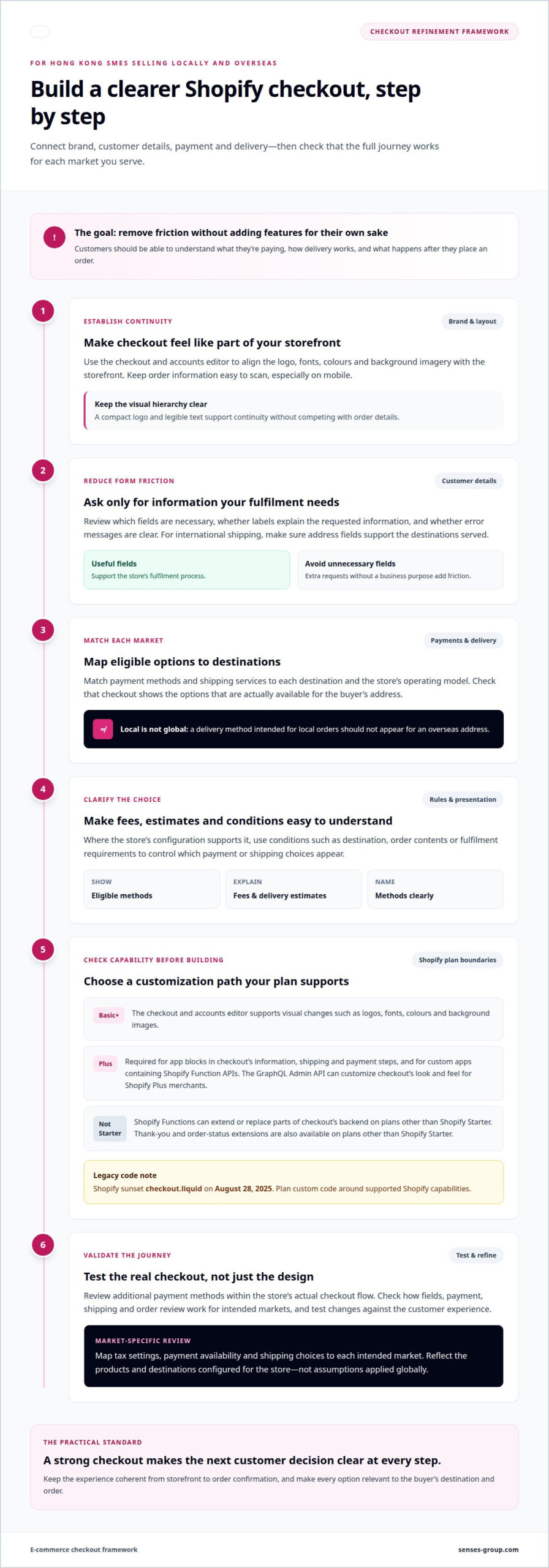
The checkout and accounts editor supports visual changes on Basic or higher plans, including logos, fonts, colours, and background images. A professional aligns these elements with the storefront, then reviews whether key details remain easy to scan on mobile. For example, a compact logo and legible text help preserve visual continuity without competing with order information.
Form design affects how buyers move through each decision. A professional reviews which fields are needed for the store’s fulfilment process, how labels explain requested information, and whether errors are clear. For a Hong Kong retailer shipping internationally, address fields should support the destinations served. The aim is a coherent form, not extra fields without a business purpose.
Payment and Shipping Options
Payment and delivery choices should suit the buyer’s market and the store’s operating model. Map available payment methods and shipping services to each destination, then check that checkout displays eligible options clearly. A delivery method intended for local orders, for example, should not appear for an overseas address.
Conditional options can make this logic more precise. Define when a payment or shipping choice should appear, using factors such as destination, order contents, or fulfilment requirements where the store’s configuration supports them. Review how fees, delivery estimates, and method names appear before payment. Clear presentation helps customers understand their choices without treating every market alike.
Checkout Customization Rules
Shopify’s supported extension points determine which changes are practical. The GraphQL Admin API can customize checkout’s look and feel for Shopify Plus merchants, and Shopify Plus is required to add app blocks to checkout’s information, shipping, and payment steps. Shopify Functions can extend or replace parts of checkout’s backend on plans other than Shopify Starter. Custom apps containing Shopify Function APIs require Shopify Plus.
Legacy code needs particular care: Shopify sunset checkout.liquid on August 28, 2025. A professional plans custom code around supported Shopify capabilities and tests additional payment methods within the store’s actual checkout flow. For Hong Kong merchants, the same review maps tax settings, payment availability, and shipping choices to each intended market. Tax treatment and delivery options should reflect the products and destinations configured for the store, not assumptions applied globally.
What is Shopify Checkout Page and its impact on Website Conversion Funnel?
Shopify’s checkout and accounts editor supports visual customization on Basic or higher plans. Checkout UI extensions for checkout steps require Shopify Plus, while thank-you and order-status extensions are available on plans other than Shopify Starter.
Checkout and Post-Purchase Page Customization
Checkout moves a customer from purchase intent to a submitted order. Its practical role is to capture required information, present the order clearly, and make the next action easy to identify. Shopify’s editor lets merchants apply brand elements, including logos, fonts, colours, and background images.
After payment, the thank-you page confirms the order, while the order-status page supports the customer’s next interaction. Consider how these pages connect to the promise made before checkout. Consistent branding and clear order details, for example, can make the transition from payment to confirmation feel seamless.
Post-purchase extensions can add relevant functionality to these stages. Shopify makes thank-you and order-status extensions available on plans other than Shopify Starter. Choose according to the customer’s task: an order confirmation should clarify what was purchased, while an order-status experience should explain what happens next.
Keep each page focused. A confirmation page crowded with unrelated promotions can make the transaction less clear. Prioritize the customer’s immediate need, then connect any further action to the store’s wider retention journey.
One-Page and Multipage Checkout
Shopify began replacing its three-page checkout template with a one-page checkout in September 2023. The formats organize the same broad decisions differently: a one-page layout brings information together, while a multipage flow separates steps across screens. Merchants should evaluate how each format presents fields, payment, shipping, and order review.
A single page can make checkout feel more consolidated, but density matters. If customers must scan a long screen to find a field or correct an entry, fewer page transitions may not improve the journey. Multipage checkout can create clearer stages, but each transition should preserve context and show progress.
Baymard Institute estimates that better checkout flow and design could increase conversion rates for large ecommerce businesses by 35.26%. That potential points to the quality of the experience, not a guaranteed outcome from selecting one format.
Professional evaluation compares the two flows against real store needs, including mobile readability, form completion, and payment review. A useful test examines where customers pause or encounter errors, then measures the effect of a focused change. For a connected buying journey, checkout journey planning should consider what customers see before payment and after confirmation.
Upselling, cross-selling and one-click checkout
Checkout offers can increase order value, but they also compete for attention during the final decision. Place each offer where it supports the purchase rather than interrupting it.
Checkout Upsells
An upsell presents a higher-value version of an item already selected. A skincare store, for example, might offer a larger size before payment, provided the value difference is clear. The offer should relate directly to the customer’s choice, not introduce an unrelated product category.
A professional assesses placement, product relevance, and how the offer affects the order summary. The original selection must remain clear, and accepting an upgrade should not create uncertainty about the final price or quantity. For Hong Kong brands selling overseas, product descriptions should also make the upgrade’s value understandable across markets.
Checkout Cross-Sells
A cross-sell suggests a complementary item rather than a more expensive version. Someone buying a camera, for example, may find a compatible carrying case useful. The connection should be immediately apparent, so the recommendation feels like a considered addition rather than a distraction.
Professionals assess whether the suggested item fits the main product, the customer’s likely use, and the store’s fulfilment setup. They also check how the added item changes the order summary and shipping choices. For a Hong Kong retailer serving international destinations, a bulky add-on may affect delivery expectations more than a lightweight accessory.
One-Click Checkout
One-click checkout reduces repeated input for returning customers by using an eligible accelerated payment method. The exact experience depends on the payment option and the buyer’s saved details. A professional reviews how that option appears alongside standard checkout, so customers can choose without confusion or pressure.
Reducing steps is not the only measure of quality. The order total, selected products, and delivery details still need to be clear before submission. For example, a buyer using an accelerated option should be able to understand what they’re authorizing, especially when purchasing from a Hong Kong store for overseas delivery.
These offers work best when each has a defined purpose. An upgrade increases the value of the chosen item; a complementary recommendation adds a related product; accelerated checkout reduces repeated entry. A professional maps each intervention to a specific point in the purchase journey and keeps the primary completion action prominent.
Test one change at a time. Compare checkout with a relevant offer against checkout without it, then assess completed orders, order value, and signs of friction. If customers add an accessory but fail to complete payment, for instance, the offer may be poorly timed or unclear. Use the results to retain, revise, or remove it.
For stores expanding from Hong Kong into overseas markets, the same offer may not suit every destination or product mix. A professional considers the relevance of the recommendation and the delivery implications for each market. The objective is a coherent purchase, not simply more prompts on the checkout screen.
Checkout apps and added functionality
Costs for checkout apps and developer work depend on the app, Shopify plan, integrations, and development scope. Service pricing is provided after a quote request. Shopify extensibility uses supported extensions and functions, with checkout-step access limited by plan.
Checkout App Functionality
Apps can add specific functions to checkout, such as loyalty reminders or delivery-date selection. Start with the customer’s task, then determine whether an app supports it at the required stage. A delivery-date feature, for example, is useful when customers need to coordinate fulfilment, not simply because another store uses one.
Shopify Checkout Blocks is an app for configuring checkout content and functions. Consider the store’s plan, destination markets, and existing integrations when selecting an app. A retailer selling locally and overseas should also assess whether the app’s content and logic suit different delivery conditions.
Checkout Extensibility and Limitations
Checkout UI extensions add supported app content to specific checkout surfaces. Shopify Plus is required for app blocks on the information, shipping, and payment steps. Checkout UI extensions for the checkout process are available to Shopify Plus merchants, while thank-you and order-status extensions are available on plans other than Shopify Starter.
Shopify Functions extend or replace parts of checkout’s backend. They’re available on plans other than Shopify Starter, but custom apps containing Shopify Function APIs require Shopify Plus. Some Function APIs are in feature preview, so implementation must account for API availability and the intended checkout use.
These boundaries shape what can be implemented. A merchant seeking a checkout-step extension needs Shopify Plus; a post-purchase change may follow a different plan pathway. Shopify’s post-purchase checkout UI extensions are in beta, and merchants must request access for live-store use. This distinction affects project planning as well as the technical build.
Plan requirements also matter across markets. Shopify market overrides can change branding and settings, and add, reorder, or remove extensions. They’re available to merchants on Advanced plans. Because a buyer’s resolved market can change during checkout or customer accounts, settings may reload and extensions may change.
Map the extension’s target, plan eligibility, and market behaviour before implementation. If an extension moves to another target for a market, Shopify unmounts it and mounts it again as a new activation. Account for this behaviour when designing and testing for each relevant market.
The number of apps does not measure checkout quality. Define the requirement, check the Shopify plan and extension point, then assess how the feature interacts with payment, shipping, and order flows. This helps prevent overlapping app functions from creating competing messages or inconsistent customer experiences.
For a Hong Kong SME preparing to expand internationally, the decision should connect technical feasibility with customer need. An app that supports a clear purchase task can strengthen the journey; an unsupported or poorly placed feature adds complexity. The right solution is the simplest supported implementation that serves the intended market.
Checkout testing and optimization practices
Professional testing turns checkout changes into decisions grounded in customer behaviour. For a Shopify store, the process connects a clear hypothesis, a controlled change, and relevant conversion measures. Effective Shopify checkout customization depends on this discipline, not visual preference alone.
Testing begins with a diagnosis, not a redesign. A professional reviews the customer journey from product selection through order confirmation, then identifies a specific point of friction. For example, repeated address errors may indicate confusing form labels, while payment failures can point to a method or configuration issue.
Next, define a focused hypothesis. If overseas buyers abandon orders after seeing delivery choices, a test might clarify shipping names or delivery information. Assessing one core change at a time helps show whether it solves the problem or creates new friction.
Choose measures that match the change. Checkout completion shows whether more customers finish, while payment errors can reveal technical friction. Average order value may help assess an offer, but it should not replace completion as the measure for a change intended to simplify checkout. Interpret these signals together.
Testing should cover customer devices and destinations. A mobile review checks whether fields, buttons, and order details remain usable on a smaller screen. A market review checks that intended shipping and payment options appear for local and overseas customers. Test each scenario against the store’s actual settings.
Shopify changes need technical checks as well as experience reviews. Test the full purchase path after updates to apps, extensions, payment settings, or shipping logic. For example, check a market-specific extension where its settings change, not only in the default market. Confirm that order details remain consistent after submission.
Use results to guide the next decision. If clearer delivery wording improves completion without disrupting another market, retain the change. If a checkout prompt draws attention away from payment, revise or remove it. This is the practical value of Shopify checkout customization: observed friction informs the next improvement.
For Hong Kong SMEs scaling through ecommerce, checkout findings can also inform acquisition strategy. If Meta or Google campaigns bring visitors whose purchase path breaks at a specific step, the store experience deserves attention alongside the campaign message. Plan professional Shopify checkout testing to connect store performance with the buying journey.
Senses Group: Ecommerce Shopify Store
Senses Group helps Hong Kong SMEs build Shopify ecommerce stores around a coherent brand and buying journey. When checkout friction reflects wider issues with store structure, brand consistency, or customer follow-up, an integrated approach can address those connections rather than treating checkout in isolation.
Its Ecommerce Shopify Store offering brings store development into the broader commercial experience. Brand Strategy and Brand Identity Design can shape how the store communicates value, while Klaviyo Email Automation supports customer communication beyond the transaction. For businesses preparing to sell locally and overseas, these elements help connect the checkout experience with the brand customers encounter before and after purchase.
Planning a Shopify store or refining its buying journey? Contact Senses Group to discuss your business needs.
Build the next stage of your buying journey
As your Hong Kong business enters new markets, checkout should evolve with the customer expectations and commercial priorities behind that expansion. Treat each improvement as part of a wider brand decision: the experience should feel coherent from first impression through purchase, while remaining practical for your store to operate.
Shopify checkout customization can be a strategic investment when it connects store functionality with a distinct market position. Senses Group combines Brand Strategy, Brand Identity Design, and Ecommerce Shopify Store development to align the customer experience with business direction. The right starting point may be a new store foundation or a focused refinement of the existing journey.
Share where your buying experience needs to go next. Contact Senses Group about checkout customization, and take the next step toward a more intentional ecommerce experience.
Frequently Asked Questions
How can a professional customize Shopify checkout using apps and checkout UI extensions?
Match each app or extension to a specific customer task, then check plan eligibility and test it in the relevant checkout area. An extension could add a useful prompt at an appropriate stage, while a post-purchase extension supports a next step after ordering. Checkout-step extensions require Shopify Plus; thank-you and order-status extensions are available on plans other than Shopify Starter.
Which Shopify checkout branding and layout settings can a professional change without coding?
On Basic or higher plans, the checkout and accounts editor supports visual settings such as logos, fonts, colours, and background images. Use these controls to carry the storefront’s identity into checkout without making essential order details harder to read. A restrained brand colour, for instance, can distinguish buttons while keeping text contrast and the payment summary clear.
How do Shopify checkout customizations affect conversion rates, page speed, and accessibility?
Changes can support completion when they clarify decisions, but extra elements can create friction. Assess completed purchases alongside errors and drop-off points instead of judging a change by appearance alone. Test performance after app or extension changes, and review keyboard navigation, readable labels, colour contrast, and useful error messages. This helps identify trade-offs before changes become part of the live buying journey.
How much do Shopify checkout customization apps and developer services cost?
Shopify Checkout Blocks is free.
How can merchants test, preview, and roll back Shopify checkout customizations?
Test changes in the store’s actual checkout flow, identify where customers pause or encounter errors, and measure the effect of one focused change.