
A clean migration is built on redirects, not just imported products. This product catalog guide to migrating from PrestaShop to Shopify explains how to map each old product URL with traffic or external links to its corresponding Shopify product URL using a 301 redirect, while translating PrestaShop’s category structure into Shopify navigation and collections. The redirect map protects the routes customers and search engines already know.
For Hong Kong SMEs expanding locally or overseas, moving platforms can support growth, but only if the catalogue and buying journey remain coherent. The platforms organize products and options differently, and PrestaShop customer passwords cannot be transferred to Shopify, so migration quality depends on careful mapping and validation rather than a simple file import. This guide covers URL redirects, product and customer-data checks, checkout testing, and launch monitoring. It also shows what a professional migration should address to keep the transition commercially focused and ready for growth.
Key Takeaways
- Map PrestaShop combinations to Shopify variants deliberately so product options, pricing and stock remain structured around the correct product.
- Use a rehearsal import to identify mismatches in product details, images and inventory before they affect the live store.
- Test the complete buying journey, including payment, shipping and tax settings, and account for customer passwords that cannot be transferred.
- Choose a migration approach based on catalogue complexity and the level of mapping and validation the move requires.
- Monitor analytics, crawl errors and redirects after launch so issues can be identified and addressed early.
How does a professional redirect PrestaShop URLs to Shopify?
A professional migration creates a controlled route from valuable PrestaShop addresses to relevant Shopify pages. A guide to migrating from PrestaShop to Shopify’s product catalog should treat redirects as part of customer journey planning, not merely a technical handover.
- Inventory old addresses before deciding where they should lead. Group product, category, content, and language-specific URLs, then record each address’s purpose and current destination. This reveals duplicated paths and outdated campaign links that a product export alone won’t show. It also separates active product pages from retired listings, so each address has a deliberate destination instead of a blanket redirect to the homepage.
- Set destination rules for products that have changed or disappeared. A current product should lead to its corresponding Shopify page. A retired item may point to a closely related alternative or an appropriate collection, depending on what remains available to customers. If a PrestaShop page has no meaningful equivalent, avoid a misleading destination. These decisions preserve the usefulness of each click, especially when an old address still appears in a campaign, saved bookmark, or external reference.
- Review redirect behaviour as a connected system. Check that a legacy address doesn’t pass through several intermediate destinations before reaching the live page. Look for loops, inconsistent slash or character handling, and redirects that point back to the old platform. Record each correction against the original address to make later troubleshooting more precise. A documented redirect plan gives launch staff an operational reference instead of leaving them to diagnose isolated links.
- Prioritize the URLs that matter most to customers and acquisition. Search visibility, external references, campaign use, and the commercial role of a page help determine review order. Shopify allows up to 100,000 URL redirects per store, so a professional allocates the redirect plan carefully rather than treating every historical path equally. A guide to migrating from PrestaShop to Shopify’s product catalog should distinguish high-value entry points from obsolete or duplicated addresses before cutover.
- Keep the redirect register useful after launch. Record the source address, intended Shopify destination, reason for the mapping, and review status. This helps connect a reported broken link to the original decision, rather than relying on memory. When a product handle or collection changes later, the register provides a clear reference for updating affected routes. A well-maintained record also supports campaign planning, as teams can use established Shopify destinations instead of circulating retired PrestaShop links.
How a migration professional verifies imported products, variants, prices, stock and images
Compare Shopify’s rehearsal import with PrestaShop records, checking product fields, variants, prices, quantities, and image access. Map product and inventory values separately from tax settings. Configure currencies for intended markets through Shopify Markets.
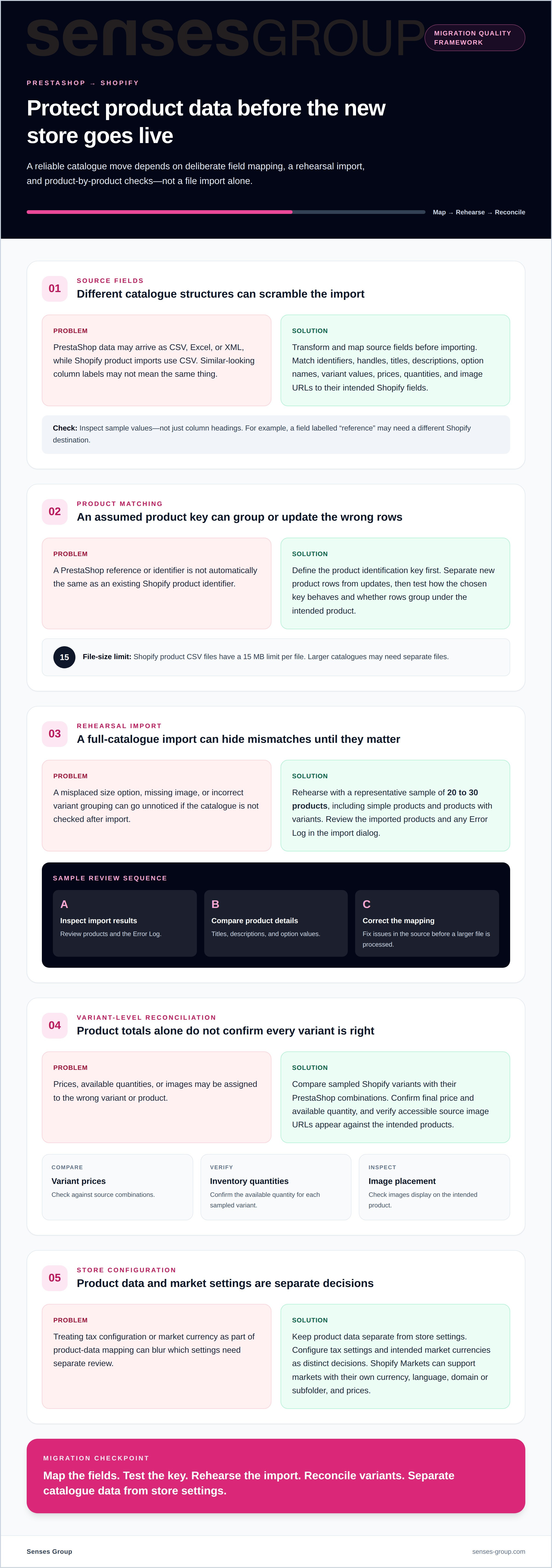
- Transform the source catalogue before importing. PrestaShop data cannot be exported directly into Shopify’s product CSV format, so map each field to its destination. Source records may arrive as CSV, Excel, or XML files, but Shopify product imports use CSV. Map product identifiers, handles, titles, descriptions, option names, variant values, prices, quantities, and image URLs. Check sample values rather than relying on column labels alone. This catches differences such as a source field labelled “reference” that needs a different Shopify destination.
- Set clear conditions for new and existing products. The professional establishes the product identification key and separates new product rows from updates to existing Shopify products. A PrestaShop reference or identifier is not assumed to match an existing Shopify resource. Before the full import, a test file confirms how the selected key behaves and whether rows group under the intended product. Shopify product CSV files have a 15 MB limit per file, so larger catalogues may need separate files.
- Rehearse with a representative sample. The professional checks 20 to 30 products against PrestaShop, including simple products and products with variants. After the test import, they review the resulting products and any Error Log in the import dialog. They compare titles, descriptions, option values, variant prices, inventory quantities, and image display. A missing image URL or a misassigned size option is corrected in the source mapping before processing a larger file.
- Reconcile prices, quantities, and images at product level. Compare sampled Shopify variants with their PrestaShop combinations, confirming the final price and available quantity. Check that accessible source image URLs appear against the intended products, not another item. Keep product data separate from store settings: tax configuration and market currency are distinct setup decisions. Shopify Markets can support markets with their own currency, language, domain or subfolder, and prices.
- Transfer customer records without promising password portability. PrestaShop passwords cannot be migrated because they are stored as one-way hashes. Map customer fields and addresses, import the records, then plan account reactivation through Shopify’s customer-access process. Customer history and orders are separate from product imports; don’t treat historical orders as active fulfilment orders. This keeps the launch workflow clear and customer records distinct from catalogue data.
For an integrated Ecommerce Shopify Store, product mapping and store setup can be planned together.
How a migration professional tests checkout, taxes, shipping and product data
For a Hong Kong store, the professional configures HKD, intended languages, shipping zones, and tax settings in Shopify. The exact setup follows the markets served and the merchant’s existing tax and delivery rules.
- Define the test scope before extracting data. Identify which product fields, combinations, images, and customer records must move, then record their source fields. Product references, option values, prices, quantities, and image addresses, for example, need clear Shopify destinations. This mapping keeps the export aligned with the store’s commercial structure instead of transferring every field without a purpose. PrestaShop data cannot be exported directly into Shopify’s product CSV format, so the source data must be transformed.
- Export the relevant product fields from PrestaShop. Include the product and variant details intended for transfer, then check identifiers, option names and values, prices, quantities, and image URLs. During mapping, sample values matter as much as column names. A field labelled “price impact,” for example, must be translated into the final price for its Shopify variant. Product images also need accessible source addresses so they appear against the correct products after import.
- Choose a transfer method based on catalogue complexity and the data required. A migration app can support structured transfers, while a transformed Shopify CSV offers a file-based route. Assess whether the chosen method handles combinations, images, customer fields, and any required order history. Shopify doesn’t provide a native CSV import for historical orders, so order records need separate handling. Customer passwords also cannot be migrated because PrestaShop stores them as one-way hashes, so account access requires a reactivation plan.
- Configure checkout settings for Hong Kong and overseas markets separately. Set HKD as the store currency where appropriate, then align languages, shipping zones, delivery options, and tax settings with the intended markets. Shopify Markets can support markets with their own currency, language, domain or subfolder, and prices. Test the configuration against representative destinations to confirm checkout shows the intended currency and delivery choices, rather than assuming every market follows Hong Kong settings.
- Run test orders before switching the domain. The professional places 3-5 test orders before pointing the domain to Shopify, checking product selection, variant pricing, stock deduction, payment flow, shipping options, and order confirmation. Each test uses a different relevant checkout scenario, such as an item with variants or a delivery destination in an intended market. Any mismatch in product data or settings is corrected before launch, protecting both customer experience and order handling.
What Happens to Customer Data During Migration?
Start by defining which customer fields, product records, and store data belong in the transfer. Then choose a manual, app-based, or agency-led migration according to catalogue complexity, variant structure, and the markets the Shopify store will serve.
To move products by CSV, a professional exports the required PrestaShop fields, transforms them into Shopify’s format, tests a sample import, then processes the corrected file. The sequence makes mismatches visible before a wider transfer.
- Assess the catalogue before choosing a method. A manual migration can suit stores with fewer than 50 products and simple variants. Larger catalogues, mixed attributes, or many combinations require more structured mapping. The professional reviews product fields, category relationships, images, customer records, and old URLs, then scopes the transfer around what the business needs at launch.
- Use manual preparation when the source structure is straightforward. Export the required product and customer fields from PrestaShop, then map each field to its Shopify destination. A product attribute such as material, for example, may need to become a product option or metafield. Manual work offers control, but inconsistent naming or variant grouping can cause import errors.
- Use CSV when the data can be organized into a clear, repeatable structure. PrestaShop catalogue data doesn’t export directly into Shopify’s product CSV format, so transform the file, align headers, and group product rows with their variants. Test a sample import, inspect errors, and correct the source file before processing the full catalogue. CSV enables a controlled transfer, but it doesn’t make the platforms automatically equivalent.
- Consider a migration app or agency-led process when the catalogue needs broader mapping and validation. Assess whether the method can handle product fields, combinations, images, customer records, and redirects together. An app can automate parts of data transfer; agency-led work adds a structured review of source data, import results, and store requirements. Neither method removes the need to check how each attribute maps between platforms.
- Set realistic preparation time around the catalogue’s condition. Preparing a 200-product PrestaShop catalogue for migration is estimated to require 90-150+ hours, including data research, restructuring, and content preparation. Consistent attributes are easier to map than mixed formats. A single-store catalogue with a few hundred products typically takes three to five weeks to migrate, while markets, language needs, and legacy URL redirect mapping affect the project plan.
- Keep customer records distinct from passwords and order history. Customer fields and addresses can be mapped for transfer, but PrestaShop passwords cannot move because they use one-way hashes. Include customer account reactivation in the migration plan, and treat historical orders as a separate data workstream. This lets the Shopify store launch with usable customer records and a clear process for existing customers.
How professionals test and monitor the Shopify launch
A controlled launch connects the domain only after the Shopify store, redirect map, and final data sync are ready. Professionals then track search visibility, checkout performance, and technical errors as separate workstreams.
-
How a professional switches the domain and launches the store
Connect the production domain to Shopify after the final product and inventory sync. Check the domain settings, then allow DNS and SSL processes to complete before treating the Shopify store as live. Confirm that key collections, product pages, and checkout load on the production domain. Don’t close the PrestaShop store during cutover; keep it available as a reference while resolving launch issues.
-
How a professional monitors sitemap and 404 errors
Submit the Shopify sitemap after the domain points to the new platform, then review crawl and 404 errors. The professional compares broken addresses with the redirect map and adds a 301 redirect when an old product or category URL lacks a valid destination. They also check that redirected pages reach relevant products or collections, rather than sending visitors to an unrelated page.
- Coordinate the launch sequence across the domain, redirects, and storefront. Confirm that priority old URLs resolve correctly, product pages show the intended content, and customers can complete the buying journey. Monitor analytics, crawl errors, and redirect performance closely for the first two weeks after launch. This review helps distinguish a temporary indexing change from a broken route or missing page. Record each issue against the affected URL and destination.
- Retain the PrestaShop store as a controlled reference after cutover. Keep it accessible but not indexed for at least 90 days after launch, reducing the risk of duplicate pages competing with the Shopify versions. During this period, the professional uses source records to resolve missing product details, image mismatches, or redirect gaps. The old store should not become the active sales destination again, because that can divide order and inventory activity between platforms.
- Complete post-launch cleanup from observed results, not assumptions. The professional reviews analytics, crawl reports, redirect performance, and customer-facing page behaviour, then prioritizes fixes affecting important products or collections. Sitemap submission confirms the new platform’s preferred URL structure, while 404 reviews reveal addresses that still need a suitable destination. Once this evidence-led cleanup is underway, plan your Shopify launch with a clear domain and monitoring sequence.
Senses Group: Ecommerce Shopify Store
Senses Group helps Hong Kong businesses build Shopify stores that support a coherent customer journey. Turn to its Ecommerce Shopify Store offering when the move calls for more than transferring product data, and the store’s structure, brand presentation, and customer communications need to work together.
Brand Strategy and Brand Identity Design can shape how the store presents the business across Hong Kong and overseas markets. Klaviyo Email Automation can support customer communications as the new store takes shape. Together, these elements connect the platform with the wider brand experience, rather than treating the storefront as an isolated technical project.
Planning a move from PrestaShop to Shopify? Contact Senses Group to discuss the next steps for your store.
Build the Next Stage of Your Shopify Store
A guide to migrating your product catalog from PrestaShop to Shopify can clarify the technical transition. The next decision is how the new storefront should support your business as it grows, serves Hong Kong customers, and reaches overseas markets. Treat the migration as a foundation for a stronger commercial experience, not simply a platform change.
Before moving forward, define what the new store needs to make easier for customers and your team. That could mean a clearer product journey, a more consistent brand expression, or a store structure ready for future expansion. Bringing these priorities into the project early connects the platform with the direction of the business.
When you’re ready to discuss your migration and Shopify plans, contact Senses Group. A clear next step can turn the platform change into a purposeful move toward your business goals.
Frequently Asked Questions
Which PrestaShop product data can be migrated to Shopify, including variants, images, categories, and SKUs?
Prepare product titles, descriptions, identifiers, prices, stock, variants, and accessible image references for Shopify import. Translate category relationships into Shopify’s product organization, and map SKUs and other identifiers to the intended fields. Product details that don’t fit standard fields may need metafields. Before transfer, define which content and attributes support customer decisions, especially if the catalogue serves different languages or markets.
Which PrestaShop-to-Shopify migration services are available, what do they cost, and how do you choose a provider?
Professional support can coordinate store development, catalogue mapping, data transfer, and launch preparation. Senses Group offers an Ecommerce Shopify Store alongside Brand Strategy and Brand Identity Design. Project scope depends on the catalogue, data condition, and migration requirements. When choosing support, assess how clearly the work defines deliverables, validation, and responsibilities for redirects and launch, not just a headline price.
How do professionals map product categories, collections, attributes, and URL redirects during migration?
Map each source category to an appropriate Shopify collection or navigation path, then assign product attributes to options or metafields according to their purpose. For example, material used for customer filtering may work better as structured product data than as a variant. Match each important old address to its closest relevant destination. This creates a coherent route from category browsing to product detail, rather than preserving source structures that don’t suit the new storefront.
How do professionals preserve SEO rankings, product URLs, and metadata when moving a catalog to Shopify?
Preserve search continuity by mapping valuable old URLs to relevant Shopify pages and carrying across useful page titles and descriptions. Keep product content aligned with the search intent behind each address instead of redirecting unrelated pages to a general destination. A migration can protect existing signals, but rankings may change as search engines process the new platform. Post-launch reviews should identify broken routes and metadata gaps so they can be corrected promptly.
What are common product catalog migration risks, and how do professionals validate data after import?
Common risks include duplicate products, incorrectly grouped variants, mismatched prices, missing images, and inventory values attached to the wrong item. Reduce these risks by comparing imported records with source examples that represent different product types, including products with unusual attributes. Review import errors, inspect product pages, and correct the underlying mapping when a pattern appears. This makes validation a quality-control process, not just a visual review of a few storefront pages.