
Fulfillment is more than a back-room process: it affects what customers can buy and what they know after checkout. A Shopify order fulfillment integration connects order and inventory data with fulfillment workflows, shipment updates, returns and delivery status, making it easier to track each order from purchase to completion.
Getting an order out the door is only part of the challenge. As a business grows, sells through multiple locations or reaches overseas customers, stock, order status and customer updates must stay aligned.
This guide explains what the integration connects and how it supports inventory and order monitoring, shipment and delivery visibility, returns handling and repeatable workflows. It also covers how Shopify App Store integrations fit into the wider setup, so you can see which parts can be automated and where clear oversight still matters.
Key Takeaways
- Understand how a fulfillment connection links Shopify orders with inventory, fulfillment activity and customer-facing updates.
- Set up stock visibility across locations so product availability on your storefront reflects inventory changes.
- Monitor shipment progress, delivery status and returns together to spot orders that need attention.
- Automate repeatable order tasks while keeping human review for exceptions, stock risks and complex shipments.
- Choose an integration model and Shopify app based on your sales channels, fulfillment setup and plans to expand locally or overseas.
What is Shopify Fulfillment Integration?
A Shopify order fulfillment integration connects store orders and inventory with the locations or services that prepare and ship them. It helps keep product availability, fulfillment activity and order status aligned between Shopify and connected platforms.
Inventory and Stock Adjustments
Inventory management starts with an accurate quantity for each product at each location. Shopify supports inventory across warehouses, retail stores and third-party logistics locations, allowing merchants to distinguish stock in a shop from stock at a fulfillment centre. This matters when both locations can fulfill online orders.
Inventory apps can check and adjust quantities on a merchant’s behalf. For example, when a sale reduces available stock at one location, a connected platform can update the quantity shown in the store. Define which locations can fulfill online orders and which stock customers can purchase.
When sending inventory to a fulfillment centre, record the quantity assigned to the receiving location before dispatch. Update that location’s inventory after receipt so Shopify reflects the stock available for orders. This separates goods in transit from stock ready to sell.
Record a clear reason for each stock adjustment, such as a sale, received shipment, return or damaged item. Apply the change to the relevant location rather than a general total. If a product is stocked in both a shop and a warehouse, this keeps their quantities distinct.
Inventory Synchronization and Troubleshooting
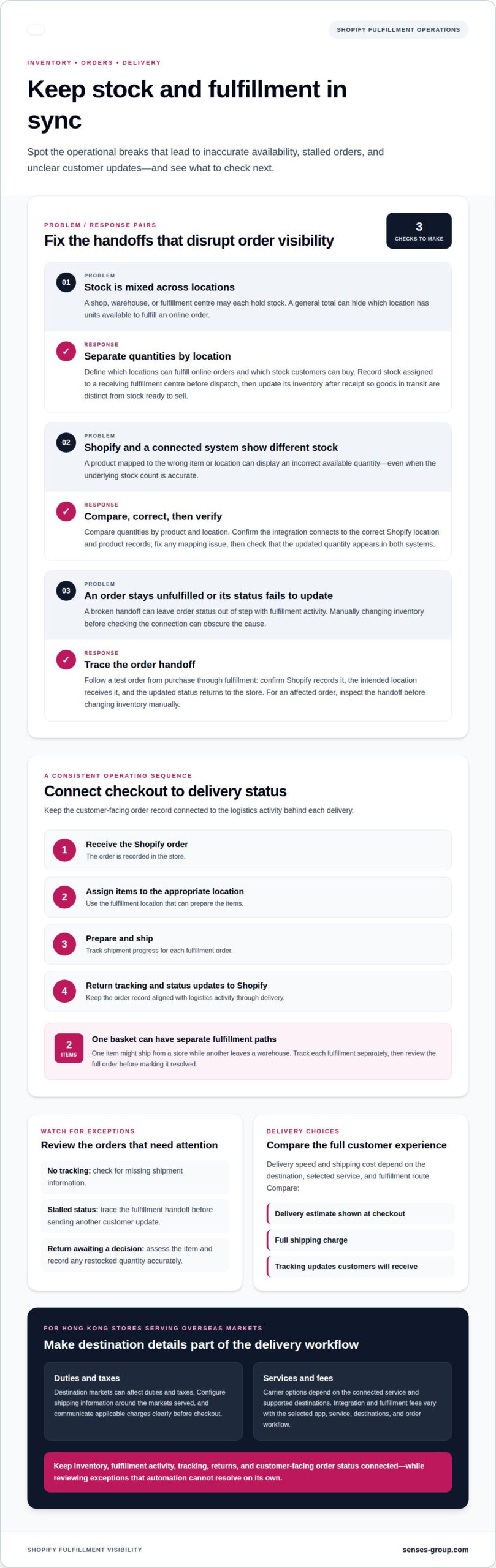
Inventory synchronization keeps Shopify and connected systems aligned as quantities or order details change. Common issues include mismatched stock, orders routed from the wrong location and order statuses that fail to update. To troubleshoot, compare quantities by product and location, then trace the affected order’s fulfillment activity.
Next, confirm that the integration connects to the correct Shopify location and product records. A product mapped to the wrong item or location can show an incorrect available quantity even when the underlying stock count is accurate. Fix the mapping, then check that the updated quantity appears in both systems.
To check order management, follow a test order from purchase through fulfillment. Confirm Shopify records the order, the intended location receives it and the updated status returns to the store. If an order remains unfulfilled, inspect the handoff between Shopify and the connected platform before changing inventory manually.
Set a consistent process for stock discrepancies. Pause fulfillment for the affected item, reconcile the physical count with the location record, and make a documented adjustment. Then confirm the storefront shows the sellable quantity. This helps prevent a synchronization issue from leading to an oversell or inaccurate order update.
Monitoring inventory, shipments, returns and deliveries
Effective monitoring links each Shopify order to its fulfillment location, shipment progress and final delivery status. A clear workflow also makes returns and cross-border orders easier to manage.
Shipment Tracking and Returns
To synchronize orders, inventory, tracking and returns, connect Shopify to a fulfillment app or service that exchanges order and status updates. When an order ships, tracking information can return to Shopify. A returns app can identify eligible items and process refunds on the merchant’s behalf.
Review stuck fulfillment statuses and shipment exceptions as part of daily operations. If an order remains unfulfilled after dispatch, trace its status through the fulfillment handoff before sending another customer update. For returns, use a defined process to assess the item and record any restocked quantity accurately.
For international delivery from Hong Kong, destination markets can affect duties and taxes. Configure shipping information around the markets served, and communicate applicable charges clearly before checkout.
Delivery Speed, Costs, and Carrier Options
Delivery speed and shipping costs depend on the destination, selected service and fulfillment route. Compare the delivery estimate shown at checkout, the full shipping charge and the tracking updates customers will receive. A low shipping charge is not the only consideration: an unclear delivery estimate can also weaken the purchase experience.
Shopify merchants can activate fulfillment services through connected apps or custom services. Carrier options depend on the connected service and its supported destinations, so there is no single carrier list that applies to every Hong Kong store. Integration and fulfillment fees also vary with the selected app, service, shipping destinations and order workflow; pricing depends on the case and is provided after a quote request.
An order may contain items with different delivery methods or fulfillment routes. Check each delivery group or fulfillment order rather than assuming one tracking path covers the entire basket.
Order-to-Delivery Workflow
Use a consistent sequence: receive the Shopify order, assign items to the appropriate fulfillment location, prepare the shipment, then return tracking and status updates to Shopify. This creates a clear record from checkout to delivery, keeping the customer-facing order status connected to logistics activity.
For an order with two items, one might ship from a store while the other leaves a warehouse. Track each fulfillment separately, then review the full order before marking it resolved. This helps identify a delayed parcel without overlooking an item that has already arrived.
Build exception checks into the workflow. Review orders that lack tracking, shipments with stalled status, and returns awaiting a decision. A well-planned storefront and fulfillment structure can keep customer updates aligned with the operational steps behind each delivery.
Order management and fulfillment automation
Shopify orders are fulfilled manually by default, but connected workflows can automate repeatable steps. A well-designed setup assigns work clearly, updates order records and preserves review for exceptions.
Automatic, Manual, and Partial Fulfillment
Manual fulfillment gives merchants control over when an order is marked fulfilled. It suits workflows where staff need to inspect items, confirm packing or resolve stock questions before dispatch. Automatic fulfillment can reduce routine handling when an order meets defined conditions and the fulfillment provider can process it.
Partial fulfillment supports orders where items ship separately or become available at different times. A store might dispatch an available item while another waits for stock. Shopify integrations can support partial fulfillment and multiple locations, recording each item’s progress without marking the whole order as shipped.
Choose a method based on stock reliability, product complexity and shipping exceptions. Keep manual approval for situations where a wrong item, split shipment or stock discrepancy requires judgment.
Automated Fulfillment Workflows
An automated workflow can synchronize new orders, assign them to a fulfillment provider, request fulfillment and update status. Shopify can route orders according to inventory availability or customer proximity. These rules direct orders to locations that can fulfill them instead of requiring staff to repeat the same routing decision.
Map each step before automating it. Define the order event that starts the process, the location or provider that receives the request, and the status Shopify should show after acceptance. Include a review point for exceptions, such as unavailable items or orders the provider cannot accept.
Automation can also print packing slips, synchronize inventory and assign orders to a provider or third-party logistics partner. Keep the sequence visible to staff so they can identify whether a delay happened during assignment, preparation or dispatch.
Order and Tracking Automation
After dispatch, an integrated workflow can return tracking information and shipment status to Shopify, linking fulfillment activity with the customer-facing order record. If tracking fails to synchronize, the order may appear incomplete even after the parcel has left the fulfillment location.
Test the full path with a sample order: confirm it enters Shopify, reaches the intended provider, changes status after fulfillment and receives tracking details. Then test a partial shipment to ensure the first parcel’s update does not incorrectly mark every item as fulfilled.
Automate predictable tasks, but retain human review for exceptions that affect stock or delivery. This lets a growing store handle routine orders consistently while staff focus on cases that require a decision.
Choosing an integration model
For a Hong Kong Shopify store, the right integration model depends on who holds stock, who dispatches orders, and how much control the team needs. Compare the operational handoff, not just the number of features.
For a smaller operation, Shopify’s built-in order handling can be a straightforward starting point. Orders stay in Shopify, and staff update fulfillment as they pack and dispatch. This provides direct oversight but relies on staff keeping order statuses current and stock records accurate.
A connected fulfillment app adds an automated handoff. It can send orders to a provider, receive fulfillment updates and return tracking details to Shopify. This suits a Hong Kong merchant working with an external logistics partner, provided the app’s locations, products and order statuses map correctly.
A custom API integration offers more control over routing rules, partial fulfillment and provider-specific workflows. It can support complex operations, such as assigning different products to separate locations. The trade-off is the need for careful design, testing and maintenance as processes change.
These models compare differently for Hong Kong stores: manual Shopify handling prioritizes direct control, an app connects existing services, and a custom integration supports tailored workflows. The deciding factors are order complexity, locations, overseas delivery plans and how much process the team wants to automate.
Assess security, reliability and inventory risks before connecting systems. Limit access to the information and actions an integration needs, and define who can change routing or stock rules. Connection failures, duplicate orders and incorrect product-location mappings can disrupt fulfillment, so include clear exception handling and a way to reconcile records.
Use these criteria to compare a provider or integration model:
- Order routing: Confirm the workflow can assign orders to the intended location or fulfillment provider.
- Inventory updates: Identify which system changes stock after a sale, receipt, cancellation or return.
- Order status: Trace how acceptance, dispatch and tracking updates appear in Shopify.
- Exceptions: Decide how staff handle rejected requests, unavailable items and split shipments.
- Market expansion: Map the locations and delivery routes needed for Hong Kong sales and planned overseas markets.
Then test a representative order from checkout through dispatch. Include a split order if different locations or providers may fulfill its items. Confirm each request reaches the correct provider, Shopify shows the resulting status and inventory changes at the expected location. Testing reveals workflow gaps before they affect live orders.
Choose the simplest model that supports current operations and the next stage of growth. A single-location store with staff-led packing may not need custom routing; a store coordinating multiple locations and external fulfillment may need more structured connections. Revisit the setup when a new channel, market or fulfillment partner changes the order path.
Shopify App Store integrations
The Shopify App Store can extend fulfillment workflows through connected apps and services. The useful question is not how many tools you can install, but which operational gap each connection addresses.
Start with the task that needs support. An inventory app can exchange stock quantities, while a fulfillment service can receive orders and send status updates. Shopify merchants can activate fulfillment services by connecting apps or custom services to Shopify admin. Keep the purpose of each connection clear, especially when a Hong Kong business sells locally and plans to serve overseas customers.
Order routing is another specific use. Shopify order routing apps use Shopify Functions to customize fulfillment and delivery strategies. Depending on the workflow, routing can help assign a purchase to a suitable location or service. For example, a store with stock in separate locations can route an order according to availability instead of sending every request to the same place.
Before installing an app, map its role in the order journey. Identify the event that starts the connection, the information it needs and the update it should return to Shopify. For an order-handling app, trace a test purchase from checkout to provider assignment and status change. Confirm that the workflow does not duplicate a step another connection already performs.
Review how each app interacts with inventory and order records. If two tools can adjust the same product quantity, define which system is authoritative. If separate apps handle routing and shipment updates, confirm they pass along the same order and fulfillment details. Clear ownership reduces mismatches that could leave the store displaying stock customers cannot actually buy.
- Define the job: Name the workflow the app supports, such as routing or fulfillment updates.
- Map the data: Identify the product, location, order and status information it uses.
- Test an example: Follow a purchase through each connected step before relying on the workflow.
- Review exceptions: Decide how staff handle rejected fulfillment requests or unavailable stock.
- Check overlap: Remove duplicated actions between connected apps and Shopify settings.
For Hong Kong SMEs, the strongest setup is usually the one that matches actual fulfillment operations and the next market expansion step. A simple local workflow may need fewer connections than one coordinating multiple stock locations and overseas delivery. Add tools to solve defined process needs, then review their combined effect on checkout, order handling and customer updates.
A well-structured Shopify store integration plan can align storefront decisions with fulfillment workflows before complexity grows.
A third-party fulfillment program may need a separate shipping account when Shopify remains the customer-facing storefront. A 3PL can handle storage, packing, shipping, and returns for Shopify store owners.
Performance can be tracked with a clear denominator: a store with 100 pending orders and 30 shipped orders has an order fulfillment rate of 30%. After its UK success, Mejuri expanded its store-as-fulfillment-center model to five North American locations and planned to scale it across more than 35 global retail stores.
Senses Group: Ecommerce Shopify Store
Senses Group helps Hong Kong SMEs build an Ecommerce Shopify Store around a clear brand and practical customer journey. Turn to this work when your store needs to connect its market position, product presentation and order experience as you prepare to grow locally or overseas.
Brand Strategy and Brand Identity Design establish the foundation customers encounter before checkout. Shopify store development brings that foundation into the shopping experience, while Klaviyo Email Automation can support relevant communications after purchase. Together, these elements align the storefront with customer expectations and the fulfillment experience, without treating logistics operations as a branding task.
To strengthen your Shopify store and customer journey, contact Senses Group to discuss your business needs.
Build a fulfillment foundation for your next stage
Your next step is to treat fulfillment as part of the customer experience, not a separate operational concern. As your Hong Kong business enters new markets, the store’s brand promise and the experience after checkout need to remain aligned. That connection starts with a clear growth plan: decide which customer experience you want to create, then shape the ecommerce journey around it.
Senses Group brings that foundation together through Brand Strategy, Brand Identity Design and an Ecommerce Shopify Store. These services connect market positioning with how customers discover, shop and engage with your business. A well-planned Shopify order fulfillment integration can fit into a store experience designed to support your direction, rather than becoming an isolated technical fix.
When you’re ready to align your Shopify store with your growth plans, contact Senses Group about integration. A deliberate foundation gives your business a stronger path forward.
Frequently Asked Questions
What is Shopify order fulfillment integration and how does it work?
A Shopify order fulfillment integration links Shopify with tools or services that help process orders. The connection may use Shopify Flow, webhooks or an API, depending on the workflow. For example, an order event can trigger a task in a connected system, which then returns fulfillment information to Shopify. The practical choice depends on the data exchanged and whether standard app settings can handle the store’s order rules.
How do I connect a fulfillment provider or shipping carrier to Shopify?
Connect a fulfillment service through a Shopify app or custom service in Shopify admin, then map the relevant products, locations and order information. Test an order to confirm the provider receives the correct details and status updates return as expected. Grant only the permissions needed, protect credentials and remove app access when the work is complete. Limit staff access to what they need for store operations.
Can Shopify fulfillment integrations support cross-border shipping from Hong Kong?
Yes. Shopify supports international fulfillment through Shopify Markets or connections with global fulfillment services. Plan how each destination market affects shipping options, duties, taxes and warehouse zones. Orders going to different countries may need distinct routing or delivery settings. Set customer-facing shipping information for the markets served, and ensure the fulfillment workflow reflects each order’s route.