
The payment step is part of your store’s sales infrastructure, not just a checkout setting. A Shopify payment gateway integration connects customer payment details to the systems that process transactions, enabling online card and digital payments. The right setup depends on where you sell, which payment methods your customers use, and how you want checkout to work.
For Hong Kong businesses selling locally and overseas, the choice is about more than accepting a card. Customers may expect familiar ways to pay, while each additional step at checkout can affect the buying experience. Shopify supports multiple payment gateways on one store, but the providers and methods available depend on the market.
This overview explains how gateways work, which payment methods and provider options you may encounter, and what to consider when checkout or payment security becomes a concern. You’ll have a clearer basis for choosing a setup that supports the customer journey as your business grows.
Key Takeaways
- Understand how gateway setup affects the customer journey, transaction processing and the costs that can arise across providers and currencies.
- Choose payment methods around the markets you serve and the ways your customers prefer to pay, not simply the longest list of options.
- Provider availability varies by country or region, so a payment method that works in one market may not appear in another.
- When a gateway is missing at checkout, focus on its setup, approval status and the conditions that determine when it is displayed.
- Learn how security features such as 3D Secure and payment tokenization help protect card transactions without exposing raw payment details to your store’s servers.
What is a payment gateway?
A payment gateway is software that communicates transaction information between a customer and a merchant to process online payments. In a Shopify store, it connects checkout with a payment provider, which handles payment authorization and processing. This is the foundation of Shopify payment gateway integration: customers submit payment, the provider processes it, and the store receives the transaction result.
For Hong Kong merchants, gateway fees vary by provider because each provider sets its own pricing and fee structure. There is no single fee schedule to apply across available providers. Compare the components that affect your actual sales: the provider’s transaction fees, any currency conversion costs, and Shopify’s separate third-party transaction fees where applicable. Evaluate them against the same order values, customer markets, and payment methods to make the comparison meaningful.
Transaction fees are charges for processing a customer’s payment. Currency conversion costs may apply when a payment involves different currencies. For example, a store selling to an overseas customer should consider the transaction currency, settlement currency, and whether the provider converts between them. Costs depend on provider pricing and the payment flow, so a low processing fee alone may not represent the full cost of accepting the transaction.
Shopify third-party transaction fees are charges Shopify applies when a merchant uses a third-party payment provider alongside Shopify Payments. These are separate from the provider’s own fees. Before enabling another gateway, account for both in your store’s payment costs. A provider may support a preferred checkout option, but its additional charges should be part of your commercial assessment.
PayPal lets customers choose its payment option at checkout. Its potential value is customer reach: shoppers who already prefer PayPal have a familiar way to pay in your store. PayPal sets its own fees, so include its transaction pricing and any relevant currency conversion costs in your comparison. The question is whether PayPal serves the markets and customers your business is targeting.
Failed-payment recovery means addressing a payment that does not complete successfully. First, find the failed transaction in the store’s payment records. Distinguish a decline from an incomplete checkout, then give the customer a clear way to retry or use another enabled method. This helps separate a processing issue from a customer who left checkout before paying. Keep recovery messages consistent with the payment status shown in Shopify.
For a Hong Kong business expanding overseas, compare gateways using the same currencies and customer journeys you expect to support. Review provider transaction fees, currency conversion costs, and Shopify’s applicable third-party fees together. That gives a more accurate view of the cost to accept payments than comparing one fee in isolation.
Payment methods and customer convenience
Payment choice shapes how smoothly a shopper moves from product selection to a completed order. For a Hong Kong store, the goal is to offer familiar options without making checkout harder to use.
Supported Payment Methods
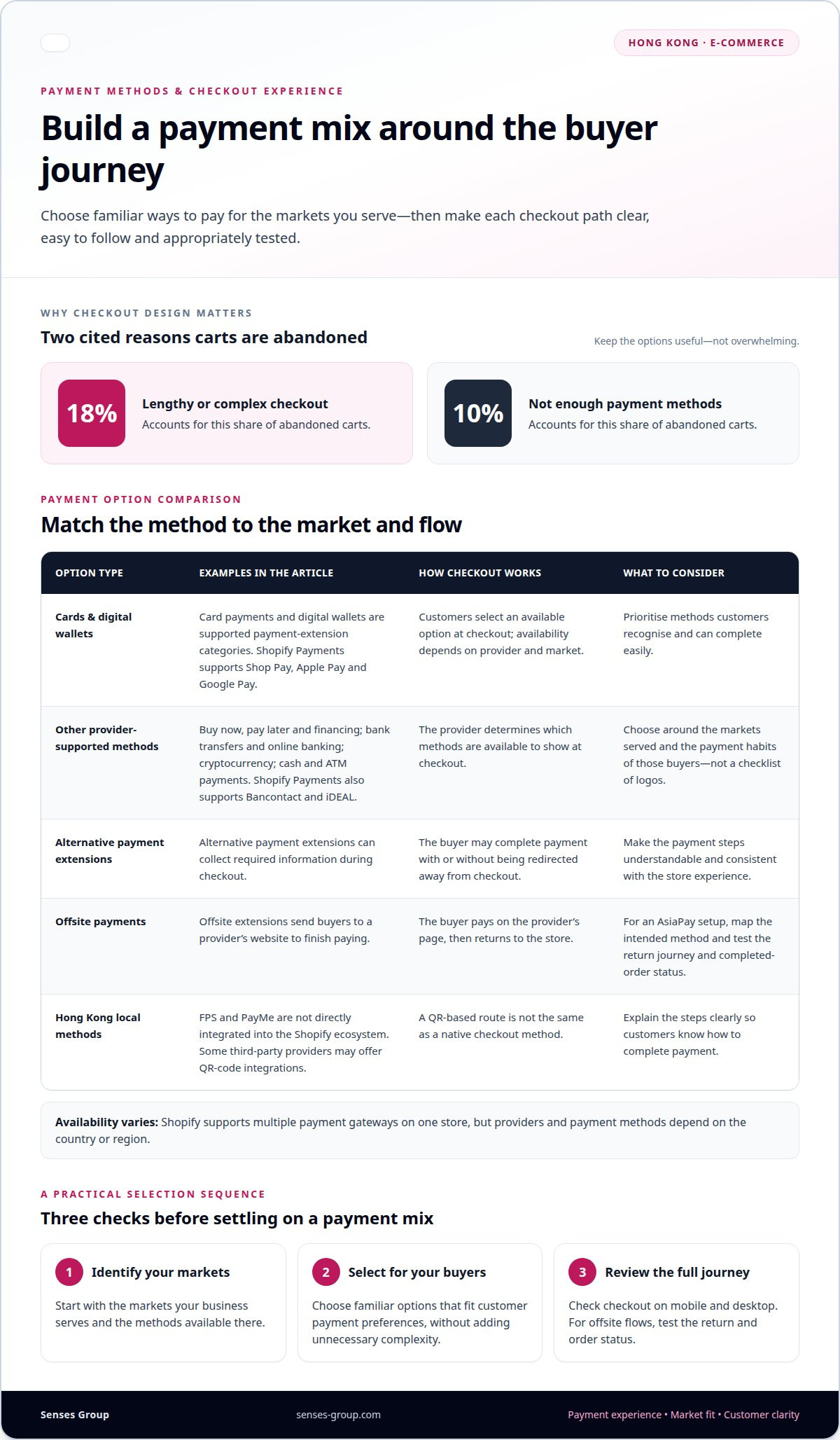
Supported payment methods are the options a provider makes available at checkout. Shopify payment extensions can support card payments, buy now, pay later and financing, bank transfers and online banking, cryptocurrency, cash and ATM payments, and digital wallets. Shopify Payments supports Shop Pay, Apple Pay, Google Pay, Bancontact, and iDEAL. Available options depend on the provider and market.
Build the payment mix around the customer journey, not a checklist of logos. One shopper may prefer a wallet, while an overseas buyer may expect a card or local online banking option. Shopify allows multiple payment gateways on one store, so merchants can combine methods where suitable. An option helps only if buyers recognise it and can complete payment easily.
Alternative and Offsite Payments
Alternative payments are checkout methods beyond standard card processing. Offsite payments send buyers to an app-hosted page to finish paying. Shopify alternative payment extensions can collect required information during checkout, with or without redirecting buyers. Offsite payment extensions send buyers to the provider’s website, then return them to the store after payment. Make that transition clear and consistent with the brand experience.
For an AsiaPay setup, map each intended payment method to its checkout flow before enabling it. Identify whether the buyer stays in Shopify checkout or moves to an external payment page, then test the return journey and completed-order status. This keeps the experience coherent across screens and helps distinguish a successful transaction from an abandoned or interrupted attempt.
Managed and Local Payment Methods
Managed payment methods are handled through an integrated provider, while local methods reflect payment habits in a particular market. FPS and PayMe are not directly integrated into the Shopify ecosystem, though some third-party providers may offer QR-code integrations. A QR-based route is not the same as a native checkout method, so explain its steps clearly to customers.
Use a practical selection sequence: identify the markets you serve, choose payment methods that fit those buyers, then review the checkout flow on mobile and desktop. Lengthy or complex checkout experiences drive 18% of abandoned carts, while not having enough payment methods accounts for 10%. The answer is not to enable every option; it is to balance customer familiarity with a focused, understandable checkout. A well-structured Shopify store experience connects payment choice with the wider customer journey.
Payment provider availability by country or region
A supported payment provider is a service Shopify can connect to accept payments in a merchant’s market. Shopify integrates with over 100 payment providers worldwide, but the available options vary by country or region.
Yes, a Hong Kong store can accept HKD and other currencies when its enabled provider supports the relevant payment currencies. Separate the currency customers see at checkout from the currency used for settlement, because these can depend on provider and account settings.
Shopify has no single payout schedule or settlement currency for Hong Kong. Each provider sets its payout timing and supported settlement currencies, so these details depend on the selected provider and its account terms.
Merchant eligibility is the provider’s acceptance of a business based on its location and account requirements. For a Hong Kong business, availability depends first on whether a provider supports merchants operating from Hong Kong. The merchant’s business details and account setup may also affect whether it can activate that provider. A payment option available to overseas merchants may therefore not be available to a Hong Kong merchant.
International currency support means a provider can process specified currencies for payments or settlement. Stripe is one provider to assess, but the useful comparison is not its name alone. Map the currencies your customers need to pay in against those the provider can process and settle for your merchant account. A buyer paying in a foreign currency and a merchant receiving settlement in HKD are separate parts of the transaction flow.
Supported countries are the markets where a payment provider can serve merchants or customers. Shopify’s provider catalogue spans over 100 providers globally, but this does not mean every provider supports every market. Build a country-by-country shortlist: record the merchant’s operating country, target customer markets, required payment currencies, and the provider’s available methods. This makes gaps visible before launch, especially when a store expands beyond Hong Kong.
Setup requirements are the account and business details needed to activate a provider on Shopify. Most payment gateways require a registered business and a current account to accept online payments. Treat activation as a sequence: select a provider available to the Hong Kong merchant, complete its account setup, then connect and configure it in Shopify. A provider’s supported currencies and payout settings should fit the store’s intended payment and settlement flows.
Installments are payment arrangements that let customers pay across multiple charges. Shopify payment extensions can include buy now, pay later and financing methods, but availability depends on provider and market. When expanding overseas, assess installment options market by market alongside currency support and merchant eligibility. The setup should reflect where the business can operate, where customers can pay, and how funds reach the merchant.
Troubleshooting gateways missing at checkout
Common causes include incomplete setup, a payment app that is not ready for activation, or a gateway that is unavailable for the store’s market. For Hong Kong stores, trace the option from provider support through Shopify approval and activation before changing checkout settings.
On-Site and Off-Site Checkout Flows
An on-site payment flow collects required payment information within checkout, while an off-site flow redirects the buyer to an app-hosted website. Shopify alternative payment extensions can collect information during checkout with or without a redirect. Offsite payment extensions send buyers to the provider’s website to complete payment, then return them to the store.
That distinction helps isolate a missing payment option from a broken return journey. If an off-site option appears but a purchase does not complete, trace the steps from Shopify checkout to the provider page and back. For an Amazon Pay setup, treat the payment button and its return flow as separate checkpoints. Confirm the integration is configured and activated before testing a purchase. Availability in one market does not mean an option will appear in another.
Shopify supports payment apps installed through a developer-shared installation link or its public list of payment gateways in the Shopify admin. If an option is absent from that list, it may not have been included: a payments extension must meet Shopify’s criteria and be approved for the public list. That approval is separate from completing the merchant’s own app setup.
Missing Gateway Integration Issues
A payment app is ready for activation when it has been configured and marked ready through the Shopify API. Until then, Shopify won’t enable activation in the admin. Follow the sequence: install the app, complete its configuration, have it marked ready, then activate it in Shopify. Each stage addresses a different reason an option may be missing.
After activation, review the checkout payment list and remove obsolete routes where necessary. A legacy gateway can leave duplicate payment methods at checkout, so deactivate it when it has been replaced. This avoids repeated options for buyers and makes a test purchase easier to diagnose.
Test each payment method in a controlled way: confirm it appears, follow its checkout flow, and check that the purchase produces the expected result in Shopify. If Amazon Pay or another intended option remains absent, distinguish provider-market availability from app readiness and admin activation. These are separate integration points, and identifying the failing stage gives you a clearer path to resolving the issue.
If the payment option is unavailable, distinguish the gateway model. Hosted payment gateways redirect customers to the gateway’s payment page, then return them to the merchant’s site after payment. Self-hosted payment gateways let merchants collect payment information on their site and send it to a third-party gateway for off-site processing.
Non-hosted payment gateways let merchants collect and process payments on-site, and typically require substantial technical work and maintenance. Shopify redeemables payment extensions let merchants accept gift card payments from third-party vendors natively at checkout.
Payment gateway security and fraud protection
A payment gateway securely processes customers’ credit and debit card payments online and in person. For a Hong Kong Shopify store, security depends on how payment information moves between checkout, the gateway, and the payment provider. The setup should protect the transaction while keeping the customer journey clear.
Payment processing is the sequence that sends payment details for authorization and returns a transaction result. A gateway API can tokenize payment information, replacing sensitive details with a token so the merchant’s servers don’t handle raw payment data. This reduces card-data exposure within the store’s technical environment. For example, customers should submit card details through the payment flow, not through a custom form that stores them.
Tokenization converts payment information into a substitute value used during processing. It helps separate the merchant’s systems from raw payment data, but doesn’t remove the need to configure the gateway carefully. Keep payment extensions current through their supported setup process, restrict access to payment administration, and ensure the customer-facing checkout accurately reflects the payment method being used.
3D Secure is an authentication step used to help verify a cardholder during an online card payment. Shopify credit card payment extensions support 3D Secure Authentication. Depending on the transaction flow, customers may be asked to complete an additional verification step before the payment proceeds. Make this step understandable in checkout, especially for overseas buyers who may see a bank authentication screen before returning to the Shopify store.
Card processing fees are provider charges for handling card transactions. The gateway and payment provider set the applicable pricing, so compare their fee structures alongside authentication and processing features. A declined payment is one the provider or card issuer does not approve. Treat declines separately from suspected fraud: inspect the transaction status, provide a clear retry route, and offer another enabled method where available. Don’t label every decline as fraudulent, as this can confuse customers and obscure the actual issue.
Fraud protection is the combination of payment controls and review practices that help identify suspicious transactions. Use the security features available in the selected payment extension, including 3D Secure for supported card flows, and review the gateway’s transaction records when a payment is declined or flagged. After launch, monitor live payment traffic closely for the first 24 to 48 hours. Compare successful, declined, and authenticated transactions to spot configuration issues early.
Security should support conversion, not create unexplained friction. A clear checkout, appropriate authentication, and protected payment handling form one connected system. For a store that needs its checkout and payment flow structured as part of its ecommerce foundation, develop a Shopify store around a coherent customer journey.
Senses Group: Ecommerce Shopify Store
Senses Group develops Ecommerce Shopify Stores for businesses building or refining their online sales channel. Turn to this work when payment choices, checkout flow, and brand experience need to function as one coherent customer journey, particularly as a Hong Kong business prepares to serve overseas markets.
Payment options sit within a wider store system. Brand Strategy and Brand Identity Design shape how the business is positioned and presented, while Klaviyo Email Automation can support customer communication after they interact with the store. Aligning these elements helps create a consistent experience from product discovery through purchase and follow-up.
If your Shopify store needs a stronger foundation for growth, contact Senses Group to discuss your project.
Build a checkout that supports your next stage
Your payment setup is part of the promise your brand makes when a customer is ready to buy. As your business expands into new markets, align checkout with your positioning, customer expectations, and commercial direction. A considered Shopify payment gateway integration can support that alignment, but it works best as part of a coherent ecommerce foundation.
Senses Group brings Brand Strategy, Brand Identity Design, and Ecommerce Shopify Store development together to help businesses build that foundation. The focus is not simply adding payment options. It is creating a store experience that carries your brand clearly from discovery to purchase and is structured for growth.
If you’re ready to develop your ecommerce direction, contact Senses Group to discuss your Shopify store. A deliberate next step can turn checkout from a technical setting into a stronger part of your customer experience.
Frequently Asked Questions
Which payment gateways are available for Shopify merchants in Hong Kong?
Available gateways depend on the merchant’s country and provider eligibility; Shopify’s payment-provider list in the admin shows the options available to that Hong Kong store. Shopify connects with over 100 payment providers globally, but that doesn’t mean every provider supports Hong Kong merchants. Check the listed provider’s supported methods and account requirements, then match them to the currencies and checkout flows your customers need.
How are refunds, chargebacks, and payment disputes handled by Shopify gateways?
Shopify payment extensions can support refunds, along with charges, authorizations, captures, and voids.