
Headless isn’t a faster Shopify theme. It’s a separate storefront connected to Shopify’s commerce backend. With headless Shopify development, a brand builds its customer-facing experience using a chosen frontend framework, while Shopify manages commerce functions such as products, carts and checkout. This separation gives you more control over the storefront, but also more responsibility for building and maintaining it.
That extra control can be valuable when a standard theme limits the way your brand needs to present products or serve customers across Hong Kong and overseas markets. But headless isn’t automatically the better choice: the right setup depends on your growth priorities, technical capacity and how much flexibility your storefront genuinely needs.
This guide explains how headless commerce works, what changes for apps and ongoing maintenance, and why separating the storefront from Shopify doesn’t guarantee faster pages. You’ll also see how Shopify’s tools, CMS choices and hosting options fit together, and when a well-chosen Shopify theme may be the more practical foundation for your business.
Key Takeaways
- Assess the full cost of ownership, including ongoing developer maintenance, before committing to a custom storefront.
- Map essential app functions early: reviews, loyalty tools, chat and popups may need rebuilding or replacement.
- Judge performance by real page experience and Core Web Vitals, not by the architecture alone.
- Match Shopify, CMS, framework and hosting choices to your team’s capabilities and plans for local and overseas growth.
- Choose a theme-based store when speed to market and simpler upkeep matter more than extensive storefront flexibility.
What is headless commerce?
Headless commerce separates a storefront’s presentation layer from its commerce backend. Shopify can manage products, inventory and checkout, while a separate frontend controls how pages look and behave. With headless Shopify development, businesses can shape components around their brand and connect the storefront to other channels. The trade-off is greater control over the experience, along with more development and maintenance responsibility.
How long does a headless Shopify development project take? Most implementations take 5-8 months. An MVP typically takes 4-5 months, a standard build 5-7 months, and an enterprise implementation 6-10 months. Scope, integrations, content preparation and testing influence the schedule.
Development and ongoing maintenance both belong in the business case. A custom frontend needs developers to build components, connect them to Shopify and maintain them after launch. Costs depend on the architecture, integrations, content model, testing needs and available development capacity. Project pricing depends on scope and is provided after a quote request. Budget separately for the initial build and continuing maintenance.
What steps are involved in building and launching a headless Shopify store? First, define storefront requirements, such as target markets, language needs and customer journeys. Next, select the frontend, CMS and hosting approach, then connect Shopify’s APIs and build the key components. Finally, test product data, checkout, shipping settings, tax handling, mobile pages and redirects before launch.
The risk isn’t the separation itself, but underestimating the work it creates. A team must coordinate Shopify data with the frontend, keep integrations working and maintain custom code. App features may need separate implementation, and storefront changes can require developer input. Before launch, assign clear ownership for updates, testing and technical issues.
What should Hong Kong businesses consider when building a headless Shopify store, including payments, shipping and taxes? Decide which payment methods and delivery options suit Hong Kong customers and overseas markets, then configure them consistently across the storefront and checkout. Shopify’s Storefront API version 2025-01 no longer returns tax and duty fields in the cart object; tax calculation occurs at checkout. Test that transition, alongside market-specific shipping settings, before launch.
For a business expanding into overseas markets, headless is most useful when the storefront needs flexibility a theme cannot provide. It is less suited to teams that prioritise a simpler launch and easier upkeep. Weigh the customer experience, channel plans, developer capacity and long-term cost of maintaining a separate frontend.
Frontend app compatibility and maintenance
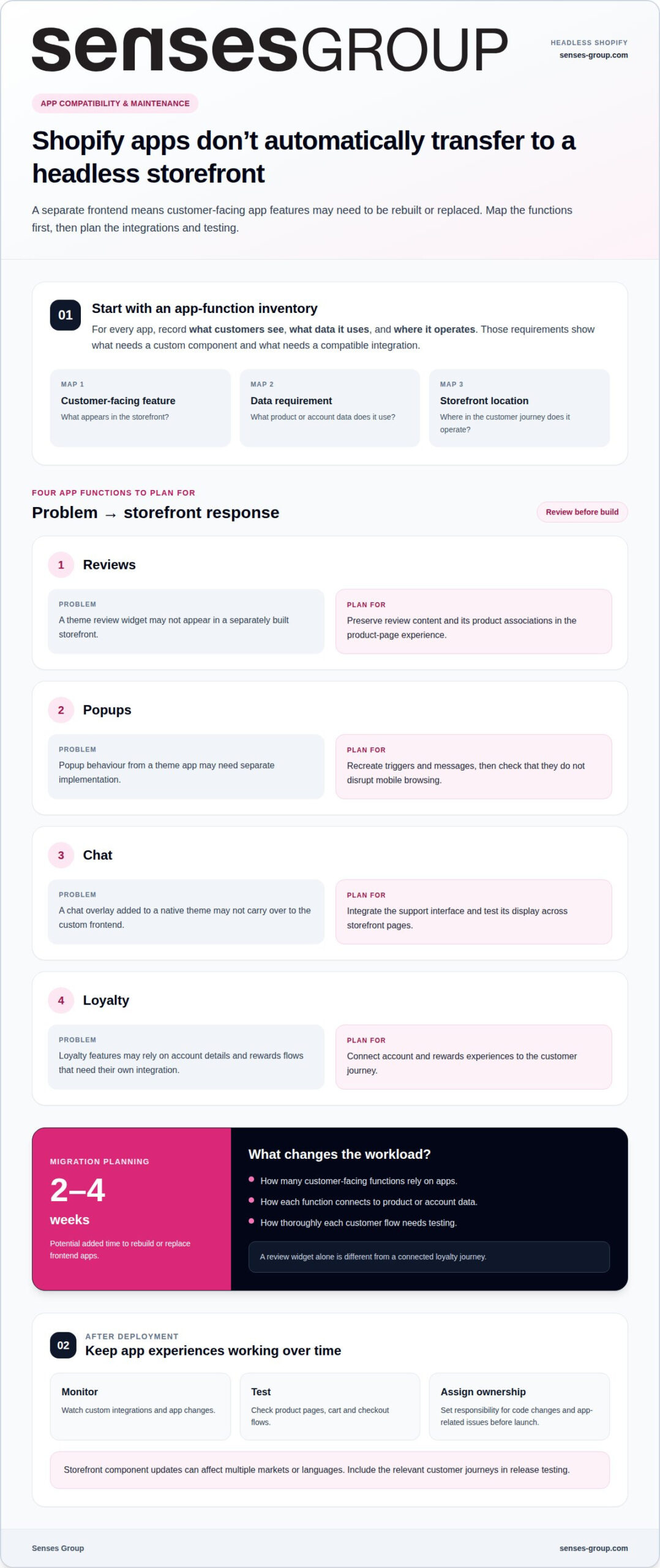
A Shopify app does not automatically appear in a custom storefront. Theme apps often add interface elements directly to Shopify’s native storefront. A headless frontend uses a separate presentation layer, so review widgets, popups, chat overlays and loyalty features need rebuilding or replacement. That affects product pages, cart journeys and customer support, not just the visual design.
Which frameworks and tools are commonly used for Shopify headless development? Shopify’s Hydrogen framework is built on Remix, and Hydrogen release v2025-07 integrates with React Router 7.9.2. Shopify’s Storefront API and Customer Account API can also be called from any HTTP client, giving development teams flexibility across frameworks and languages.
Start with an inventory of app functions, not a framework decision. For each app, record what customers see, what data it uses and where it operates. A review widget may need product ratings and review content. A loyalty tool may need account details and rewards. A popup may depend on page behaviour or customer segments. These requirements reveal which functions can be replaced with custom components and which need a compatible integration.
- Reviews: Preserve review content and product associations in the product-page experience.
- Popups: Recreate triggers and messages without disrupting mobile browsing.
- Chat: Integrate the support interface and test its display across storefront pages.
- Loyalty: Connect account and rewards flows to the customer journey.
Allow for this work before setting a launch date. Rebuilding or replacing frontend apps can add 2-4 weeks to a headless Shopify migration. The added time depends on how many customer-facing functions rely on apps, how they connect to product or account data, and how thoroughly each flow needs testing. A review widget alone is different from a connected loyalty journey.
Maintenance continues after deployment. Developers need to monitor custom integrations, test updates and confirm that app changes still work with product pages, cart and checkout. A storefront component update can affect multiple markets or languages, so release testing should cover the relevant customer journeys. Assign clear ownership for code changes and app-related issues before launch.
Shopify’s APIs allow a flexible stack, but flexibility creates decisions around deployment, monitoring and updates. Hydrogen with React Router offers a Shopify-focused route; other stacks can use Shopify APIs through HTTP clients. Choose based on the team’s ability to maintain the code, not novelty. A focused Shopify storefront plan can help connect app requirements with the customer experience before implementation begins.
Shopify Online Store 2.0 suits speed-to-market and ease of maintenance. Headless costs more than a Shopify theme to build and run, requires developer maintenance after launch; budget development and maintenance at 2,000-5,000+ EUR per month.
Performance, page speed, and Core Web Vitals
A headless storefront can improve speed, but architecture alone doesn’t guarantee it. Shopify’s Hydrogen and Oxygen provide a Shopify-focused framework and hosting option. Developers still need to optimise images, limit scripts, connect integrations carefully and design efficient page components. A custom storefront can load slowly if these decisions add unnecessary work.
Use Largest Contentful Paint (LCP) to assess how quickly the main page content appears. Google recommends an LCP of 2.5 seconds or less for at least 75% of visits, measured separately on mobile and desktop. For a Hong Kong retailer, that means mobile product pages deserve their own performance review, rather than relying on desktop results alone.
Time to First Byte (TTFB) adds another diagnostic measure. Google considers a TTFB below 800 milliseconds acceptable. If TTFB is slow, investigate the server response and data requests. If TTFB is healthy but an image-led product page still has slow LCP, review image size, rendering and third-party scripts. This distinction helps teams address the cause, not just the score.
Theme optimisation remains a meaningful comparison point. If LCP stays consistently above 3.5 seconds after theme optimisation, investigate whether the underlying architecture or integrations constrain performance. That is a reason to assess the system, not an automatic instruction to rebuild. A custom frontend adds components and code that also require careful performance management.
- Measure by device: Compare mobile and desktop LCP separately.
- Inspect the bottleneck: Separate server response delays from slow page content.
- Review integrations: Check whether scripts delay product details or key actions.
- Retest after changes: Recheck product pages, navigation and checkout after deployment.
Speed has commercial relevance, but study results need context. A four-week study of mobile sites across Europe and the US linked a 0.1-second speed improvement to an 8.4% higher retail conversion rate. That finding signals why small delays deserve attention, while its study markets should not be treated as a forecast for Hong Kong stores.
For Hong Kong businesses selling across regions, test key journeys on mobile networks and across target markets. Keep product imagery, language content and tracking scripts in the performance review. Hydrogen and Oxygen offer deployment capabilities, but the final experience depends on how teams connect data, hosting and integrations. Measure real pages after launch, then prioritise fixes by customer impact.
Every 100ms delay can reduce conversion rates by up to 7%. Teams can treat speed changes as commercially relevant while validating impact through store-specific measurement. Veloretti’s headless Shopify production store achieved a Lighthouse score of 95+, providing an example of what careful implementation can reach. It is not a guarantee for another build, so teams should compare real customer journeys and performance data before drawing conclusions.
Shopify Plus, CMS, and hosting options
A headless Shopify stack separates commerce operations from the storefront, so each layer needs a clear role. Shopify manages products, orders and checkout; a frontend framework presents the customer experience. A content management system (CMS) can organise editorial content, landing pages and market-specific copy. Hosting runs the storefront infrastructure. These choices should support one operating model, not create disconnected platforms.
Shopify Plus is Shopify’s enterprise-level platform for larger businesses with more complex needs. The subscription tier and storefront architecture are separate decisions: choosing Plus does not itself require a headless build. A Hong Kong business should assess operational complexity, channel requirements and plans for overseas markets. If a theme already supports the required customer journey, adding a custom framework may introduce unnecessary infrastructure to maintain.
Shopify’s Hydrogen framework is Remix-based. Shopify says Hydrogen can be deployed at no cost with Oxygen, its built-in edge hosting. This offers an integrated path from framework to hosting, while Shopify’s headless APIs can also connect with nearly any technology stack. Developers choose the language, framework, hosting and workflows that suit the team’s capabilities.
Choose a CMS based on your content model. A product catalogue, campaign landing pages and market-specific editorial content have different needs. Map who creates and updates each content type, where it appears and how it connects to Shopify products. For example, a campaign page featuring a product should link reliably to the correct Shopify item, rather than duplicating product information in the CMS.
- Shopify: Keep commerce records, orders and checkout connected to the sales platform.
- Frontend: Choose a framework the team can develop and maintain.
- CMS: Structure editorial content and assign clear publishing workflows.
- Hosting: Match deployment and infrastructure to the framework and operating team.
Before committing, define how changes move through the system. A product update in Shopify should appear correctly on the storefront. An editorial change in the CMS should publish without breaking product links. A framework release should be tested before deployment. These handoffs shape the daily workload as much as the initial platform choice.
For Hong Kong SMEs, the right stack supports local operations while leaving room for overseas content and customer journeys. Compare Shopify’s Hydrogen and Oxygen route with other API-compatible frameworks based on internal skills, integrations and deployment processes. Document ownership for content, platform updates and infrastructure. A cohesive stack is not the one with the most components; it is the one your business can operate reliably as markets and orders grow.
When headless Shopify is right for a brand
Headless commerce suits brands whose customer experience needs more flexibility than a Shopify theme can provide. It separates the storefront from Shopify’s commerce backend, letting a team shape design and interactions independently. That freedom matters when a distinctive buying journey supports a clear commercial goal, not simply because a custom structure seems more advanced.
What are the pros and cons of headless Shopify versus a standard Shopify theme? Headless offers greater control over the storefront and how it connects to other channels, but requires custom development and ongoing technical ownership. A standard Shopify theme is a stronger fit when speed to market and easier maintenance matter more than extensive frontend flexibility.
Consider a Hong Kong brand building different buying journeys for local customers and overseas markets. If its current theme cannot support the required content structure or channel experience, a separate frontend may help. The Storefront API connects the custom storefront to Shopify’s commerce data, while the team controls how that data appears. Inventory and product information still need to remain consistent between systems.
The business case should include more than the initial launch. A headless storefront has a three-year total cost of ownership roughly 2-3 times that of a native Shopify Plus implementation. That difference makes headless harder to justify for a small catalogue or a team without developer capacity. The commercial case strengthens when frontend flexibility supports specific brand or market requirements over time.
- Consider headless when a theme blocks a defined customer journey or brand experience.
- Keep the theme when existing components support the sales model and the team values simpler updates.
- Assess capacity by identifying who will maintain the frontend, integrations and deployment process.
- Connect the decision to growth by defining which market or channel requirements the new structure must solve.
A useful decision test is whether the business can name the constraint it needs to remove. “We need a more distinctive brand experience” becomes actionable when translated into specific storefront requirements, such as a different product discovery path or market-specific content. If the team cannot identify what the current theme prevents, a custom build may add complexity without changing the customer experience.
For Hong Kong SMEs weighing that choice, start with brand fit, market plans and the team’s ability to sustain the architecture. A theme remains a sound option for businesses prioritising straightforward operations. If a more tailored storefront is central to your growth plan, develop an ecommerce storefront shaped around your brand.
Senses Group: Brand Strategy
Senses Group helps businesses align brand direction with their Shopify storefront. If you’re weighing a custom build against a theme, Brand Strategy can clarify the customer experience and market position your store needs to support. Brand Identity Design and an Ecommerce Shopify Store connect that direction to the visual system and online buying journey, while Klaviyo Email Automation supports ongoing customer communication.
Turn to Senses Group when your storefront needs to reflect a sharper brand position or support expansion into local and overseas markets. The focus is not technology for its own sake, but a coherent experience built around commercial priorities.
Contact Senses Group to discuss how your brand strategy and Shopify store can work together.
Make your next storefront decision deliberate
Your next step is to define what the storefront must make possible for your business. Set out the customer experience you want, the markets you plan to serve and the operational capacity available to support the technology. This brief gives your team a stronger basis for deciding whether a custom frontend advances the brand or distracts from more immediate priorities.
Good headless Shopify development starts with commercial intent, not a framework choice. The architecture should reinforce how customers discover, understand and buy from your brand, while fitting the way your team works. A clear decision now can help keep future changes aligned with the experience you want to build.
Talk with Senses Group about the role a tailored Shopify storefront could play in your growth plans. Discuss your headless Shopify plans and take the next step with a clearer direction.
Build with purpose, and let the customer experience lead.
Frequently Asked Questions
When is a traditional e-commerce platform a better fit for your business?
A traditional, theme-based store is often a better fit when your current platform supports the customer journey and your team wants straightforward content and design updates. For example, a Hong Kong startup with a focused product range may value launching and managing its store without maintaining a separate frontend. Choose a custom architecture only when you can identify a specific experience or operating requirement that the existing setup cannot support.
What is headless Shopify development?
It means building a custom storefront that connects to Shopify’s commerce functions through APIs. Shopify can continue managing product and order data, while the separate frontend determines how customers browse and interact with the brand. For example, a retailer might create an editorial product discovery experience while keeping Shopify as its commerce backend. The custom storefront also brings responsibility for code updates and technical upkeep.
How does Shopify headless commerce architecture work?
The architecture connects a frontend, Shopify’s commerce services and often a CMS. A customer opens a product page; the frontend requests product information through Shopify’s Storefront API, then presents it using the site’s design. When the customer proceeds to checkout, the storefront connects them with Shopify’s checkout flow. A CMS can supply campaign content, while Shopify remains the source for product and inventory information.
How much does a headless Shopify store cost to build and maintain?
Cost depends on project scope and is provided after a quote request. Key factors include the frontend framework, CMS, integrations, content requirements, testing and developer maintenance after launch. Consider the build and upkeep separately: a custom storefront requires ongoing technical work, not just an initial implementation. For planning, define the customer journeys and systems involved, then determine who will manage updates and fixes.
How does headless Shopify affect SEO, site speed, and conversion rates?
Headless can give a team more control over page structure and performance, but those elements require deliberate implementation. For SEO, keep product URLs stable or redirect changed paths, and ensure search engines can access page content and metadata. For conversion, assess product discovery, mobile usability and checkout continuity. Compare the same customer journeys before and after launch to see whether changes improve the experience.