
The best ecommerce website design on Shopify is not simply a polished theme; it’s a responsive store built around your products, customers and growth plans. For Hong Kong SMEs looking to sell locally and overseas, Shopify can bring design, product discovery and checkout into one connected shopping experience.
A polished storefront matters, but it can’t do the work alone. Mobile usability, clear product information and a straightforward path to purchase all help customers move confidently from browsing to buying.
This guide explains how Shopify themes and apps, responsive design, checkout, hosting and security fit together, and what to consider when choosing an ecommerce website builder. You’ll learn how to assess whether Shopify suits your business, what a well-planned store needs, and how design decisions can support growth without unnecessary complexity.
Key Takeaways
- Design mobile product pages for quick browsing, clear information and smooth navigation, then test them on real devices.
- Choose a theme that supports your brand and store structure; add apps only when they solve a defined business need.
- Reduce checkout friction by making key purchase details easy to find and keeping the path to payment straightforward.
- Compare website builders by how well their design flexibility, reporting and growth tools fit your sales plans.
- Build trust with strong product imagery, visible policies and customer reviews that help shoppers make informed decisions.
Responsive mobile design
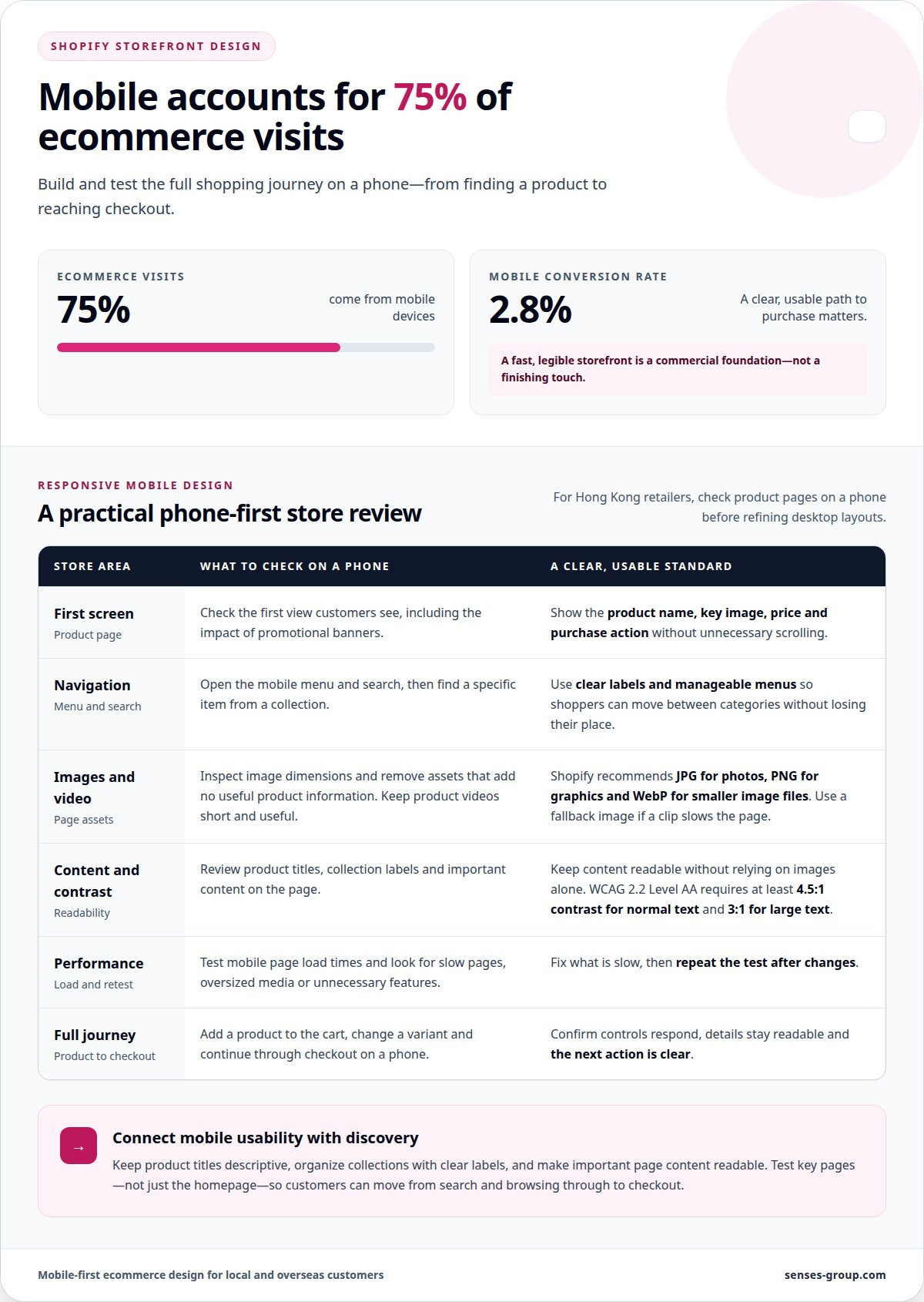
Optimizing a Shopify website for mobile, speed, SEO and conversions means making every step usable on a small screen. Start with responsive layouts, compress visual assets, clarify product information and test the complete journey, from search result to checkout. Mobile devices account for 75% of ecommerce visits, while their conversion rate is 2.8%. A fast, legible storefront is a commercial foundation, not a finishing touch.
Responsive design adapts the same store to different screen sizes without forcing customers to pinch, zoom or hunt for controls. For a Hong Kong retailer, test product pages on a phone before refining desktop layouts. Check whether navigation, search, variant selection, delivery information and add-to-cart actions remain visible and easy to use. Then repeat those checks on key pages, including collections, product details and checkout.
Mobile performance depends partly on what each page asks a device to load. Shopify recommends JPG for photos, PNG for graphics and WebP for smaller image files. Choose the appropriate format, inspect image dimensions and remove assets that add no useful product information. Shopify also recommends limiting videos, choosing short clips and providing fallback images. A product video should clarify use or detail without delaying access to the price and purchase options.
Use this practical review to connect speed with the shopping experience:
- Review the first screen. On a product page, show the product name, key image, price and purchase action without unnecessary scrolling. Keep promotional banners from pushing essential details below the fold.
- Test navigation. Open the mobile menu and search function, then find a specific item from a collection. Clear labels and manageable menus help shoppers move between categories without losing their place.
- Check imagery and video. Compare JPG, PNG and WebP assets for the right balance of clarity and file size. If a short product clip slows the page, use a fallback image and retain only useful footage.
- Measure, then fix. Test page load times on mobile and identify slow pages, oversized media or unnecessary features. Shopify recommends testing load times and fixing anything slow, so repeat the test after changes.
Mobile layout also affects discoverability and action. Keep product titles descriptive, organize collections with clear labels and make important page content readable without relying on images alone. For accessibility, WCAG 2.2 Level AA requires a minimum contrast ratio of 4.5:1 for normal text and at least 3:1 for large text. Apply those thresholds to text and backgrounds, including buttons and navigation.
Finally, test the full journey rather than the homepage alone. Add a product to the cart, change a variant and continue through checkout on a phone. Confirm that controls respond, details remain readable and the next action is clear. A considered ecommerce website design on Shopify connects responsive layouts, mobile speed, search-friendly content and a focused purchase path, giving Hong Kong businesses a stronger base for local and overseas customers.
Shopify themes and apps used by ecommerce stores
A Shopify theme sets the storefront’s structure, while apps add capabilities. Choose both to suit your product range, brand direction and growth plans.
Shopify Theme Selection
Compare themes by how they present your catalogue, not just by an eye-catching homepage preview. Check collection navigation, product page layouts, filtering options and how the design works with your photography. If you plan to sell in multiple markets, consider whether the structure supports clear, market-specific content. Shopify releases new themes and features called Editions every six months, so include platform updates in your planning.
Store Design Examples
Examples can turn design preferences into practical decisions. Ghia’s Shopify website uses the Dawn theme, while Shock Surplus uses Pipeline. Study each store’s page hierarchy, product presentation and navigation rather than copying its visual style. A design that suits a beverage catalogue may not work for technical parts or a broad apparel range. Use examples to identify useful patterns, then adapt them to your products and customers.
AI-powered tools can help shape early storefront work, but they don’t replace commercial judgement. Use AI to draft a first-pass product description, organize content ideas or explore alternative page structures. Then review every output for accurate product details, consistent brand voice and relevance to Hong Kong and overseas customers. Treat generated material as a working draft, not ready-to-publish content. The store still needs a clear product hierarchy and a coherent customer journey.
Shopify App Store extensions can add functionality, but each app should solve a defined problem. Before installing one, identify the task it supports, such as customer reviews, product discovery or email capture. Consider whether its features overlap with existing tools and whether it adds work to store management. Keep your app set focused. A crowded stack can make updates harder to coordinate and obscure which tools improve the customer experience.
Use a deliberate setup sequence before launch:
- Map the catalogue. Group products into collections and define the details shoppers need to compare them.
- Apply the theme. Set typography, colours and page layouts around the brand and product content.
- Add essential extensions. Install only the apps that support a priority store function.
- Review the journey. Test product discovery, cart actions and checkout using real store content.
- Prepare launch content. Check product descriptions, navigation labels and customer-facing policies.
For a store that needs a more unified visual direction, considered Shopify store design can connect theme choices with brand presentation and the customer journey.
The Beauty Shop created 300 pen-and-ink illustrations for Weston Table, inspired by 19th-century engravings, showing how distinctive visual assets can shape a storefront’s presentation.
Checkout, hosting, and security
For a Hong Kong Shopify store, make its privacy notice and purchase terms easy to find. Explain what information checkout collects, and state relevant delivery, payment, and return conditions clearly. These practices help customers understand a transaction before they submit an order.
Checkout design influences whether shoppers complete a purchase. Baymard calculated an average cart abandonment rate of 70.22% from 50 studies. That benchmark is not a forecast for an individual store, but it highlights why each checkout step deserves scrutiny. Remove avoidable form fields, use clear labels, and keep the order summary easy to review. A customer buying skincare, for example, should be able to confirm product choice, delivery details, and the final order before submitting.
For Hong Kong and overseas customers, make payment and delivery information visible before checkout begins. State which payment methods the store accepts, explain how delivery choices appear, and avoid introducing unexpected conditions at the final step. Test the journey with a real product, from cart through order confirmation. Review the customer-facing messages too, including the confirmation page and email, so the purchase feels connected rather than interrupted.
Hosting is part of your store’s operating foundation. Consider how Shopify, domain settings, your theme and connected apps work together. A custom domain supports a consistent brand presence, while poorly coordinated apps can add complexity. Keep a record of essential account access and store configuration. Before changing themes or integrations, identify what the change could affect, then test key pages and checkout.
Security also depends on how your business manages access. Assign individual staff accounts instead of sharing a login, limit permissions to each person’s role, and remove access when responsibilities change. Use strong, unique passwords and available account protection features. Review connected apps and their permissions regularly. An app that no longer supports a store process shouldn’t retain access simply because it was once useful.
Use a launch review that covers the full transaction:
- Review privacy and purchase information. Check the privacy notice, product claims, delivery details, and return conditions.
- Test checkout. Complete a test order and inspect form fields, order totals, confirmation details, and customer messages.
- Review account access. Confirm staff permissions and remove obsolete app connections.
- Retest changes. After updates to a theme or app, repeat the purchase journey on desktop and mobile.
A dependable ecommerce website design on Shopify aligns checkout clarity, platform setup, and disciplined access management. For Hong Kong businesses preparing to sell overseas, that structure makes essential information easier to understand and store operations easier to govern.
Make your privacy notice and purchase terms easy to find. Explain what information checkout collects, clearly state payment, delivery and return conditions before customers order, and review product claims as part of your launch checks.
Choosing an ecommerce website builder
Choose a builder around the business model you need to operate, not the design demo alone. Shopify supports direct-to-consumer products, business-to-business products, services and digital products. A Hong Kong retailer selling physical goods will assess catalogue management and order workflows; a consultancy selling bookings or downloads has different requirements. Write down your current sales process and planned overseas expansion before comparing platforms.
Shopify websites include integrated SEO controls, analytics and reporting. These tools can inform decisions about page content, product visibility and store performance. Identify which reports answer real business questions, such as which products attract attention or where customers leave the shopping journey. A dashboard is useful when its information points to an action, such as improving a product page or adjusting a collection.
Assess each builder against these practical criteria:
- Store model. Map products, services or digital items to the way customers browse and buy. Confirm that the builder’s structure can represent your catalogue without awkward workarounds.
- Brand control. Review how the theme handles typography, colours, page sections and product imagery. The storefront should express a distinct identity, rather than resemble an untouched template.
- Growth needs. List the functions required for launch and the functions needed for future markets. Separate essential capabilities from ideas that can wait.
- Daily operations. Trace a routine task, such as updating a product or reviewing an order. The system should fit the team’s workflow, not create avoidable manual steps.
- Measurement. Decide which sales and marketing questions matter, then check whether the builder’s reporting can inform those decisions.
For Hong Kong SMEs, international ambition should shape platform selection early. Consider how product information, currencies, payment options and delivery details will appear to customers in each intended market. These are planning questions, not reasons to add every feature at launch. Prioritize the markets and customer journeys that matter first, then structure the site so new content can be added coherently.
Compare the complete operating system, not just its front-end appearance. Review the theme, apps, content workflow, checkout and reporting as one connected experience. Shopify can suit businesses that want their storefront and commerce activity managed within the platform. Another builder may suit a business with specialized content structures or workflows outside its core store. Write down your deciding requirements before committing.
Use a simple decision sequence: define your sales model, list launch requirements, test a representative customer journey and assess reporting against business goals. Then consider the effort required to maintain the setup as your product range or target markets expand. A deliberate choice creates a stronger foundation for design, marketing and future growth.
What are the essential features of a high-converting Shopify ecommerce website design?
A strong Shopify product page helps customers understand the offer, trust the business and choose a clear next step. Visual impressions form quickly: people can judge a website’s appeal in as little as 50 milliseconds. Build the first view around a clear brand identity, useful product information and an obvious route to explore or buy.
Product imagery should answer practical questions, not just decorate the page. According to Baymard Institute usability testing, 56% of users began exploring product images immediately after reaching a product page. Show useful angles, close-up details and the product in context. For a skincare brand, for example, images can help shoppers inspect packaging and texture before reading ingredients and use guidance.
Product copy should make comparisons straightforward. Present the product name, price, key attributes and available options in a consistent order. A clothing store might explain fit and material near the size selector, while a homeware store could highlight dimensions and care details. A clear hierarchy helps shoppers scan, compare and decide without searching through unrelated information.
Trust signals reduce uncertainty at the point of decision. Shopify recommends showing contact information, return policies and customer reviews on a user-friendly website. Place those details where shoppers can find them, such as a visible contact link, a concise returns summary near product information, and reviews beside relevant items. Keep claims accurate and make policies easy to understand for Hong Kong customers and overseas buyers.
Use this page-level review before launch:
- Clarify the offer. Check that each product title and opening description explain what the item is and who it serves.
- Support evaluation. Pair useful product images with specific details, such as material, size or included components.
- Make action obvious. Give the add-to-cart control a clear label and strong visual distinction from secondary links.
- Surface reassurance. Make contact details, return terms and customer reviews easy to locate.
- Keep brand cues consistent. Apply the same typography, colour palette and writing style across product and collection pages.
Conversion-focused design also depends on coherence across the journey. A customer arriving from a search result should recognize the product and promise on the landing page. Keep campaign wording aligned with product titles, and direct visitors to the most relevant collection rather than a generic homepage. For a Hong Kong business expanding overseas, make market-specific product information clear without changing the core brand experience.
Review these elements together, not as isolated design details. A considered ecommerce website design on Shopify connects product imagery, useful copy, trust signals and a clear purchase action. Build a Shopify store around your brand identity and give each product page a purposeful role in the customer journey.
Senses Group: Brand Strategy
Senses Group can help Hong Kong businesses turn storefront decisions into a connected brand and sales system. If your Shopify store looks disconnected from your positioning, or its structure isn’t ready for local and overseas growth, Brand Strategy can clarify the direction before design and development. Brand Identity Design then brings that direction into a consistent visual experience, while an Ecommerce Shopify Store connects the brand to the shopping journey.
For businesses aiming to build stronger customer relationships after purchase, Klaviyo Email Automation can support relevant follow-up through email. The right starting point depends on where your current store is underperforming: brand clarity, storefront experience or customer communication. Contact Senses Group to discuss the next step for your Shopify store.
Build your next stage around a stronger store
Your Shopify store should support the business you’re building, not just the products you sell today. As your range, customer expectations and target markets evolve, your brand and storefront need to stay aligned. That’s the strategic value of ecommerce website design on Shopify: creating a foundation that can grow with your commercial direction.
Senses Group brings Brand Strategy, Brand Identity Design and Ecommerce Shopify Store development together to create a more coherent customer experience. If you’re planning a new store or refining one that no longer reflects your ambitions, book a Strategy Call to clarify the next step.
Contact Senses Group about your Shopify store and take the next step toward building an online presence that feels distinctive and ready to grow.
Frequently Asked Questions
How do you design and launch a Shopify online store step by step?
Start by defining your customer, product range and first sales market, then build the store around those decisions. Map the main pages, prepare brand assets and complete a sample product listing before adding the rest of the catalogue. Set up the domain and key store settings, then review the site with real product information. Before launch, place a test order and check the customer-facing confirmation and staff workflow.
Which Shopify themes are best for ecommerce website design?
No single Shopify theme is best for every ecommerce business. Compare theme demos using your own products and content, then assess how each handles collections, product details and brand presentation. Ghia’s store uses Dawn, while Shock Surplus uses Pipeline, showing that stores can choose different themes. Treat those examples as references, not a ranking. Choose a theme whose structure supports your catalogue and is practical for your team to maintain.
What common Shopify website design mistakes and security risks should Hong Kong merchants avoid?
Hong Kong merchants should avoid unclear product claims, confusing purchase terms and collecting customer details without a clear business purpose. Security risks also include phishing attempts, excessive account permissions and leaving access active after a team member changes roles. Train staff to recognize suspicious login messages, restrict sensitive store access, and review account activity when something seems unusual. Keep customer-facing privacy information understandable, and describe accurately how order and delivery updates are handled.