
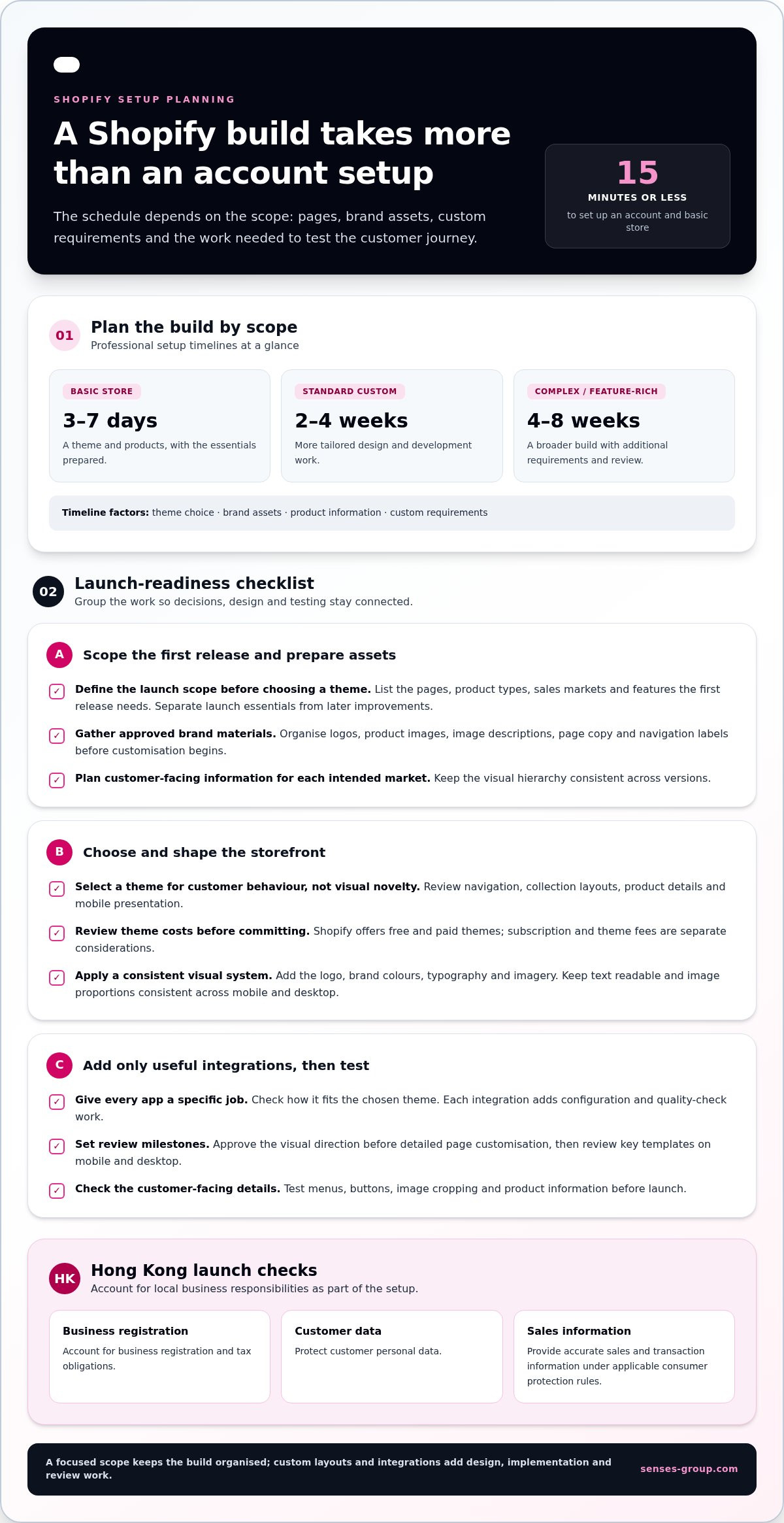
A Shopify store can be opened in about 15 minutes, but a professional Shopify store setup typically takes longer: 3-7 days for a basic store, 2-4 weeks for a standard custom build, and 4-8 weeks for a complex or feature-rich store. The timeline depends on what the store needs, not just how quickly an account can be created. A polished storefront is only the starting point; the pages, customer journey and sales operations must work together.
If you’re building a Hong Kong business for local customers and overseas growth, it’s sensible to want a clear estimate before committing time and resources. The key is to distinguish a quick launch from a store that’s ready to support your brand and day-to-day selling.
This guide explains what affects setup time and walks through the practical steps: planning pages, configuring products and custom features, choosing apps, and setting up checkout, payments, and shipping. Focused preparation can keep the build moving, while careful testing helps catch problems before launch.
Key Takeaways
- Match your theme and brand elements to the way you want customers to understand and navigate your store.
- Choose custom features and apps around specific business needs, so your store gains useful functions without unnecessary complexity.
- Organise homepage, collection and product pages to make browsing and product selection clear for local and overseas customers.
- Configure checkout, payment options and delivery methods as one customer journey, then test the experience across devices before launch.
- Build for more than appearance: a well-structured store can support customer trust, smoother operations and future growth.
How long does it take to set up a Shopify store?
A Shopify account and basic store can be set up in about 15 minutes or less. A basic store with a theme and products typically takes 3-7 days; a standard custom build takes 2-4 weeks, while a complex or feature-rich build typically takes 4-8 weeks. Theme choice, brand assets, product information, and custom requirements shape the actual workload.
For stores operating in Hong Kong, account for business registration and tax obligations, protect customer personal data, and provide accurate sales and transaction information under applicable consumer protection rules.
Compare Hong Kong Shopify experts by reviewing relevant storefront examples, written scope, theme and app responsibilities, testing, and handover. Choose a team whose deliverables connect clearly to business goals and launch milestones.
- Define the launch scope before selecting a theme. List the pages, product types, sales markets, and features the first release needs. A store selling a focused range of products can often use an existing theme, while a business requiring tailored page layouts or specialised functions needs more design and development work. Clear priorities help distinguish launch essentials from later improvements.
- Select a theme around customer behaviour, not visual novelty. Review the theme’s navigation, collection layouts, product details, and mobile presentation. Consider how customers will find products and understand key information. Shopify offers free and paid themes; subscription and theme fees are separate considerations, so review recurring platform costs alongside any one-time theme purchase before committing.
- Install the theme and establish the visual system. Add the logo, brand colours, typography, and imagery, then customise the homepage and core templates. Use consistent image proportions and readable text so products remain the focus on mobile and desktop. For example, a Hong Kong lifestyle retailer can use a concise homepage banner, clear collection links, and consistent product photography to guide browsing.
- Prepare brand assets before customisation begins. Gather approved logos, product images, image descriptions, page copy, and navigation labels in one organised folder. Missing assets interrupt design decisions and can delay page reviews. For overseas sales, plan how product names and customer-facing information will read in each intended market, then keep the visual hierarchy consistent across versions.
- Connect apps only after mapping the customer journey. Identify the specific task an app must support, such as reviews or email sign-up, then check how it appears within the chosen theme. An app may add interface elements or settings that require styling and testing. Keep the initial setup focused, because each integration adds configuration and quality-check work.
- Set review milestones and test the finished theme. Approve the visual direction before detailed page customisation, then review key templates on mobile and desktop. Check menus, buttons, image cropping, and product details. A basic setup may move quickly when assets are ready; custom layouts and additional integrations extend the schedule through design, implementation, and review.
Custom modules, features, and app integrations
Map each feature to a customer need before adding it to your commerce platform. App subscriptions, custom development, and ongoing maintenance all affect the total cost of ownership.
When hiring a Shopify developer, define deliverables, ownership, testing, documentation, and ongoing maintenance in writing. Budget for app subscriptions and future updates, and compare proposals by scope rather than headline price.
-
Plan Apps and Custom Content
List the specific customer task each app or content block should support, such as product comparisons, size guidance, or an FAQ section. The Shopify App Store offers more than 16,000 apps, so assess how each candidate fits your workflow, theme, and other integrations. Avoid overlapping tools that create duplicate messages or conflicting customer data.
Decide which content belongs in reusable templates and which needs a custom module. A reusable delivery-information block, for example, keeps guidance consistent across product pages. Keep the launch scope focused, and record each app’s purpose, settings, owner, and renewal terms.
-
Add Analytics and Customer Feedback
Decide which business questions your analytics should answer before connecting tracking tools. Map key actions, such as product views, search use, add-to-cart activity, and completed orders, to the reports you’ll review. Confirm integrations record these actions accurately without duplicating events.
Pair those signals with customer feedback from reviews, support requests, and post-purchase comments. Look for repeated friction, such as unclear product details or confusing navigation, then prioritise changes by customer impact. Keep feedback requests brief and explain their purpose clearly.
-
Build Support Content Around Real Questions
Create a support route customers can find in the main navigation or footer. Group common questions into clear topics, such as order changes, product care, and delivery information. Write answers in plain English, and use consistent policy language across FAQs, product pages, and automated messages.
For a Hong Kong retailer serving overseas buyers, distinguish local information from market-specific details. Avoid promising a response time or outcome the business cannot consistently deliver.
-
Use Liquid Customisation Selectively
Ask a developer to identify the exact store experience that needs a custom Liquid change before editing theme code. A tailored product-information tab may solve a clear content problem; a fully custom module may be unnecessary if theme settings already support it.
Document each change and test it with relevant products, screen sizes, and theme updates. Keep custom code limited to defined needs so future maintenance remains understandable.
-
Test Every Integration Before Launch
Run a complete journey from a landing page through product discovery, support content, and checkout. Check that app elements display correctly, analytics record intended actions, and feedback forms submit properly. For a cohesive build, an integrated Shopify store can connect customer-facing features with the wider commerce experience.
Homepage, collections, and product page setup
Build these pages into one shopping journey, from first impression to purchase. Clear navigation, accurate pricing, and consistent product information help customers move smoothly through each step.
-
Set Up the Homepage and Collections
Arrange the homepage around customer priorities: a clear value proposition, a visible route to key collections, and a focused promotion where relevant. Use specific navigation labels, such as “New Arrivals” or “Homeware,” instead of broad terms. Create collections around how shoppers browse, then check every link leads to the intended products and works on mobile.
Use collection descriptions to explain useful distinctions, such as materials or product use. Avoid filling the homepage with competing banners. One strong route into the catalogue is easier to follow.
-
Add Products, Variations, and Inventory
Enter each product with a consistent title, description, price, images, and relevant options. Shopify listings can include variants, inventory tracking, and shipping details. For a clothing item, set each available size and colour as a variant, then enter the corresponding stock so customers can choose an option that’s available.
Check that prices and variant names match your source records. Use a clear inventory process, especially when online and physical shop sales draw from the same stock. Review product details before making listings visible.
-
Organize Product Listings and Merchandising
Sort products in each collection with customer intent in mind. Put a relevant best-selling or newly launched item near the top, and use consistent product titles to make browsing easier. Apply tags and product categories consistently so filters help shoppers narrow choices without producing empty or confusing results.
Show pricing clearly beside the purchase option. If a promotion applies, make its conditions easy to understand on the product page. Review the collection from a customer’s perspective, checking that the order supports comparison instead of obscuring important choices.
-
Prepare Product Photography and Video
Use product images that show each item clearly, including a clean primary image and useful detail views. Keep backgrounds, crops, and lighting consistent across a collection. For example, a skincare retailer can pair a front-facing package image with a close-up of its texture and a scale reference.
Add video when it demonstrates a meaningful detail, such as how a product opens or moves. Check the image order and video playback on mobile.
-
Review the Shopping Journey
Open the homepage, follow a collection link, select a variant, and add the product to the cart. Confirm that navigation, inventory, pricing, and product information stay consistent throughout this journey. Repeat the review on a phone and desktop, since layout changes can affect image visibility and product selection.
Checkout, payment gateways, shipping, and delivery
Configure payment, checkout, and fulfilment as one connected customer journey. For Hong Kong businesses, clear delivery choices and accurate order details help prevent avoidable friction.
-
Configure Payment Providers and Checkout
Select payment gateways that suit your customers and are available for your store. Shopify supports options such as Shopify Payments, PayPal, Amazon Pay, cryptocurrency, and other available gateways. Review how each option appears at checkout, along with its currencies and settings, before enabling it.
Keep checkout fields focused on information needed to process and fulfil orders. Use consistent wording for delivery and payment steps, and make error messages easy to understand. Test both a successful transaction and a failed attempt. Shopify’s Bogus Gateway instructions use the number 2 to simulate a failed transaction.
-
Set Up Shipping and Delivery
Configure shipping zones for the destinations your business serves. Set rates and methods to match your fulfilment approach, such as free or flat-rate shipping, weight- or location-based rates, local delivery, and pickup. Confirm each eligible destination shows the correct options at checkout.
Review product shipping details alongside each rate. A mismatch between an item’s details and the checkout cost can undermine confidence before purchase. Use clear delivery descriptions, and avoid promising timelines your operation cannot consistently meet.
-
Build a Practical Pre-Launch Checklist
Check the full order journey before launch. Place test orders, confirm payment processing, review confirmation messages, and verify that order details appear correctly in Shopify. Test the experience across browsers and devices, including a phone and desktop computer.
Also check shipping zones, rate calculations, pickup or delivery options, and checkout links. Keep a simple record of each test, its result, and any corrections. After changing a payment or shipping setting, test the affected step again.
-
Reduce Checkout Friction
Walk through checkout as a first-time customer. Confirm product, delivery, and payment information stays clear from cart to order confirmation. Remove unnecessary distractions, use straightforward labels, and check that the payment gateway responds as expected.
For a Hong Kong store selling overseas, review destination options and rates carefully. A checkout optimised for conversion is not merely short; it gives customers enough information to complete an order confidently. Revisit the journey whenever you change payment settings, shipping methods, or checkout content.
Benefits of professional Shopify store setup
A well-built online store offers value beyond launch. Strong structure connects brand, shopping experience, and daily operations, giving each section a clear commercial purpose.
- Build a journey around customer decisions. Map how visitors move from a landing page to product discovery, comparison, and checkout. For example, a Hong Kong retailer selling homeware can connect room-based collections with useful product details. This makes the next step clearer and helps customers understand a product before purchasing.
- Make the brand consistent across the store. Apply the same visual language to navigation, product pages, and checkout. Consistent typography, imagery, and tone help customers recognise the business as they browse. A professional Shopify store setup connects these choices to the brand’s position, rather than treating each page as a separate design task.
- Use design to support conversion, not just appearance. Prioritise clear product information, focused calls to action, and straightforward navigation. Then assess performance using your own store data. A professional Shopify store setup gives these elements a deliberate role in the customer journey, while avoiding assumptions that design changes alone guarantee more sales.
- Reduce friction that can weaken sales. A Shopify store taking more than three seconds to load could lose up to 32% of visitors. Review image sizes, app behaviour, and page elements during setup. Faster, more usable pages give customers fewer reasons to abandon browsing, especially when shopping on mobile connections.
- Make daily operations easier to manage. Set up products, inventory, orders, and customer communications as connected workflows. For example, clear variant records help staff distinguish product options while processing orders. When the store structure reflects how the business runs, routine updates become easier and teams spend less time correcting inconsistent information.
- Prepare the foundation for future growth. A well-planned store can support new collections, overseas audiences, and marketing campaigns without rebuilding every page. Define launch priorities, then document custom features and integrations. A professional Shopify store setup can give your business a coherent base for its next stage. For a connected build, explore Shopify store development as a practical next step.
Senses Group: Brand Strategy
Senses Group helps Hong Kong businesses connect brand direction with a Shopify store built for growth. Turn to its Brand Strategy and Brand Identity Design when your positioning or visual identity needs clearer definition before the store takes shape. Its Ecommerce Shopify Store offering brings that direction into the customer journey, from the storefront to key shopping steps.
For businesses preparing to build repeat customer relationships, Klaviyo Email Automation can support email communication connected to the store. The right starting point depends on your priorities, whether you’re shaping a new brand, launching online, or aligning both for local and overseas markets.
Visit senses-group.com to discuss your Shopify store plans with Senses Group.
Build your next stage of growth into the store
Your store should be more than a digital catalogue. Treat it as the foundation for how customers discover your brand, make decisions, and return as your business expands. A professional Shopify store setup works best when its structure reflects your commercial priorities rather than simply copying another retailer’s design.
Before your next update, identify the business challenge your store needs to solve. You might need clearer brand positioning, a more consistent identity, or an online experience that better supports your product range. Use that priority to shape improvements and assess whether each change strengthens the customer journey.
Senses Group brings brand direction and Shopify development together for businesses ready to turn their plans into a coherent ecommerce experience. If you’re preparing a launch or planning your next stage of online growth, contact Senses Group about your store.
Choose your next step with intention, and build a store your business can grow into.
Frequently Asked Questions
What’s included in a professionally built Shopify store?
A professional Shopify store setup brings the brand, storefront, and selling process into one working system. It can include account and theme configuration, page structure, product information, payment and delivery settings, selected apps, and pre-launch testing. Clarify who controls the domain, store account, and connected tools. For example, documenting access and update responsibilities helps your team manage the store confidently after launch.
What determines the cost of a Shopify store build in Hong Kong?
The price depends on project scope and is provided after a quote request. Key cost factors include design requirements, page and product volume, custom functionality, app integrations, and the amount of content preparation involved. Separate recurring platform and app charges from build costs in your budget. A clear scope helps you compare proposals by what they include, not just the headline price.
What are the steps to set up a Shopify store professionally?
First define your products, audience, and launch priorities. Then choose a theme, prepare brand assets, organise pages and collections, enter product details, and configure selling and fulfilment settings. Connect tools only when they support a defined task. Before launch, review the store as a customer and check access, notifications, and staff workflows. This sequence helps prevent operational details being left until the final review.
How should a Shopify store be configured for SEO, analytics, and conversion tracking?
Give each key page a distinct purpose, descriptive title, and useful customer-facing copy. Keep product and collection navigation clear, and use descriptive image text. Define which customer actions matter, such as product views or completed purchases, then test tracking for accuracy. Review reports regularly so marketing decisions reflect observed store behaviour rather than assumptions about visitor preferences.
Which theme, apps, and integrations suit a Shopify store?
Select a theme based on your catalogue, brand needs, and customer journey, not visual novelty alone. Choose apps for specific functions, such as reviews or email capture, and avoid tools that duplicate one another. A professional Shopify store setup also considers how each integration handles data and fits existing workflows. Assign someone to review settings and remove tools that no longer serve a clear purpose.
How long does Shopify store setup take, and what affects the timeline?
A basic store may be ready within days, while a custom or feature-rich build can take several weeks. Timing depends on the amount of design and development, product and content readiness, integrations, and review cycles. Delays often occur when assets or decisions arrive late. Name a decision-maker, organise product information early, and consolidate feedback to keep each approval stage moving.