
A custom Shopify theme must do more than look good: it should make products easy to find, work smoothly on mobile, and guide shoppers toward purchase. A Shopify theme customization agency should bring responsive design, useful app integrations, search-friendly structure, and brand-led storefront pages together around those goals. For a business serving customers in Hong Kong, the result should support local shoppers and provide a coherent foundation for overseas growth.
A strong visual identity matters, but it can’t make up for confusing navigation, slow pages, or product information that leaves shoppers uncertain. Your theme needs to connect your brand’s look with how customers browse, compare, and buy.
This guide explains how to choose a theme, decide between adapting a template and building a bespoke storefront, and plan app integrations without unnecessary complexity. You’ll also learn how to shape homepage, collection, and product pages around your brand and shoppers, with mobile usability and search visibility considered from the outset.
Key Takeaways
- Assess a theme by how well it supports mobile browsing, clear navigation, and a straightforward route to purchase, not by visuals alone.
- Choose between adapting a template and building bespoke based on your brand requirements, growth plans, and the functionality your store needs.
- Integrate apps around specific customer and operational needs; unnecessary tools can add complexity without improving the shopping experience.
- Plan theme development with search visibility, performance, and future updates in mind, rather than treating them as launch-day fixes.
- Shape homepage, collection, and product pages to help shoppers discover, compare, and understand what you sell.
What are the key elements of an effective custom Shopify theme?
Before hiring a Shopify theme customization agency, prepare your brand assets, product information, customer priorities, and examples of storefronts you like. Common risks include broken layouts, app conflicts, and lost theme settings. Reduce them by duplicating the theme, documenting changes, and testing before launch.
Follow a clear sequence: plan the layout, design for mobile, protect site speed, then test checkout and key pages.
-
Plan Wireframes and Theme Designs
Map the homepage, collection page, product page, and checkout journey before approving the visual design. A wireframe should show where navigation, product details, trust information, and calls to action will appear. Then review a clickable prototype on desktop and mobile. Check that every screen supports the shopper’s next decision, and avoid decorative sections that distract from product discovery.
Use the prototype to agree on hierarchy before development begins. For example, a Hong Kong skincare store might prioritize product benefits, ingredient details, and delivery information on product pages. Clear decisions at this stage reduce conflicting feedback during theme design and give developers a practical reference for each template.
-
Prioritize Responsive Mobile-First Design
Design for narrow mobile screens first, then adapt the layout for tablets and desktops. Check that menus, product filters, image galleries, and buttons work with touch, rather than relying on hover effects. Keep headings concise, make essential product information easy to find, and adapt the layout instead of simply shrinking desktop content.
Speed belongs in the design brief, not just the final technical review. Compress large product images, avoid unnecessary animation, and test pages on mobile connections. One Shopify store reported a 15% increase in mobile conversions after streamlining checkout and improving mobile page speeds, illustrating how usability and performance can work together.
- Review checkout as a complete purchase path. Remove avoidable distractions, make costs and delivery details easy to find, and test the flow from product selection through confirmation. Customizing a Shopify checkout flow can increase conversions by as much as 35%. Treat that figure as potential, not a promised result; the effect depends on the store and its shoppers.
- Turn PSD designs into Shopify components with a developer-ready handoff. Provide the approved files, fonts, image assets, spacing rules, and desktop and mobile layouts. Ask for each design element to be mapped to its Shopify template, section, or block. This supports a maintainable implementation rather than a static visual copy that is difficult to update.
- Protect the live store while testing custom changes. Duplicate the current theme, record edits, and test navigation, product variants, forms, app behaviour, and checkout before publishing. Review the same pages at common screen sizes. A staged release provides a clear comparison point and helps isolate issues before shoppers encounter them.
Bespoke themes versus customised template themes
Choose an approach by comparing your brand requirements, available resources, and storefront needs. The right solution gives your audience a distinctive experience without adding complexity that does not support conversion.
-
Compare Bespoke and Template Themes
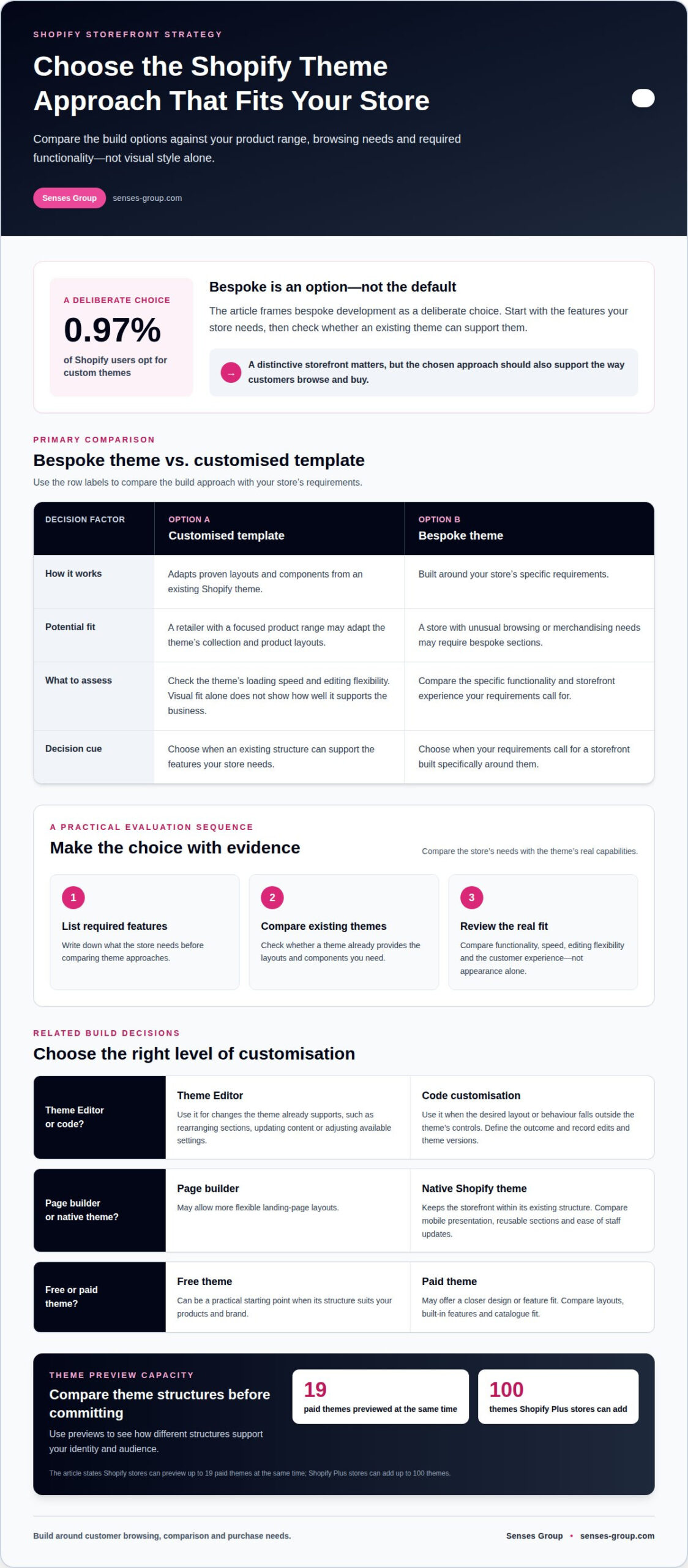
Start by listing the features your store needs, then compare them against an existing Shopify theme. A customised template adapts proven layouts and components, while a bespoke theme is built around your specific requirements. Only 0.97% of Shopify users opt for custom themes, so bespoke development is a deliberate choice, not a baseline requirement.
For example, a retailer with a focused product range may adapt a template’s collection and product layouts. A store with unusual browsing or merchandising needs may require bespoke sections. Review the template’s loading speed and editing flexibility before choosing, since visual fit alone does not show how well it supports the business.
-
Choose Between Editor and Code Customization
Start with Shopify’s Theme Editor for changes the theme already supports, such as rearranging sections, updating content, or adjusting available settings. This lets your team manage routine updates directly. Use code customization when the required layout or behaviour falls outside those controls, and define the desired outcome before changing theme files.
Keep a record of code edits and the theme version they affect. That makes later updates easier to assess and reduces confusion when the storefront changes. A Shopify store can preview up to 19 paid themes at the same time, while Shopify Plus stores can add up to 100 themes. Use previews to compare how different structures support your identity and audience.
- Compare page builders with native Shopify themes using a real page as an example. A page builder may allow more flexible landing-page layouts, while a theme keeps the storefront within its existing structure. Compare mobile presentation, reusable sections, and ease of staff updates. Don’t add a builder for a single visual effect if the theme can already deliver it.
- Compare free and paid Shopify themes by reviewing their layouts, built-in features, and fit for your catalogue. A free theme can be a practical starting point when its structure suits your products and brand. A paid option may offer a closer design or feature fit. Either way, test representative product and collection pages, not just the homepage.
- Make the decision against your next stage of growth. List the functions needed now, the formats your team must update, and the new markets or product ranges you expect to support. Avoid choosing bespoke development for status, or a template solely for convenience. If your storefront needs a stronger visual foundation, brand identity design can help align its presentation with your market position.
Theme integration with websites and third-party apps
For stores serving customers in Hong Kong, plan language, currency, payment, and delivery options for each target market. Connect only services that support a defined commerce task, then test how they work together before launch.
Agencies can configure storefront content and checkout options for local and overseas audiences. Test the language, displayed currency, payment flow, and delivery information for each market as one complete customer journey.
- Inventory the systems your store already uses before connecting new services. List your product catalogue, customer records, inventory tools, payment options, and delivery workflows. For example, identify where product details are maintained and which system is the source of truth. This map helps prevent duplicate records and unclear ownership when Shopify exchanges information with another platform.
- Define the precise task for every third-party service or API integration. An inventory system might update product availability, while a customer platform could receive order details. Record what information moves, in which direction, and what should happen if a transfer fails. Share the workflow with the developer, then test sample products and orders before using live commerce data.
- Plan each local and overseas storefront experience around real customer needs. Decide which languages, currencies, payment methods, and delivery choices the relevant markets require. For a Hong Kong store selling overseas, review product descriptions, currency display, checkout labels, and delivery information together. A translated page alone won’t create a coherent buying experience if the remaining steps feel unfamiliar.
- Connect marketing and SEO tools to specific goals, not simply because they’re available. For example, decide how to measure campaign traffic and which customer actions matter. Align social links and campaign landing pages with the store’s navigation and brand identity. Review page titles, headings, and product information within the theme so search visibility is built into the storefront.
- Choose apps for the functionality they add, and remove overlapping tools. A reviews app and an email platform can serve different purposes, but multiple apps doing similar jobs may complicate updates. For example, assess whether Klaviyo supports a defined customer communication workflow before integrating it. Test the app’s storefront elements, forms, and data flow in a duplicate theme, then gather staff feedback.
- Use a staged launch to catch integration issues before shoppers encounter them. Run a test order, confirm product and customer data behave as expected, and review the experience on mobile. Check that marketing links lead to the right pages and each checkout route displays the correct information. Record issues, prioritize anything that blocks purchases, and refine other details after feedback.
Custom Shopify storefront and theme development
Shopify theme development brings together storefront strategy, architecture, implementation, and search readiness. Customization can cover templates, sections, visual styling, functionality, and technical testing for an online store.
-
Plan Theme Architecture
Start by mapping the templates your store needs, such as home, collection, product, and editorial pages. Decide which sections should be reusable and which need distinct layouts. A Shopify developer can then structure the theme around those requirements instead of duplicating page elements throughout the store.
Shopify themes use Liquid alongside HTML, CSS, and JavaScript. Experienced development also considers APIs and modern web standards when integrations or custom behaviour require them. Define how product data, navigation, and reusable sections connect before coding. This architecture helps keep templates consistent while giving teams practical control over future content updates.
-
Follow the Theme Development Process
Set a clear process before implementation begins: confirm requirements, establish design direction, develop the theme, test it, then prepare launch. Agree on milestones and project updates so decisions and dependencies stay visible. For reference, a typical Shopify template theme project takes 8-12 weeks, while a bespoke theme project takes around 6-8 months.
Use a staging theme to review development without changing the live storefront. Test product templates, navigation, forms, and app interactions on desktop and mobile. Record feedback against specific pages or components, then resolve issues that block purchases before launch. A structured review makes approvals more useful than scattered comments on screenshots.
-
Define Customization Services
List the theme work required before development begins. Shopify theme customization can include adapting templates, creating sections, styling storefront components, building responsive layouts, and testing functionality. It can also include technical SEO foundations and integration work when the store needs connected tools.
Separate theme tasks from broader ecommerce work. For example, changing a product-page layout is theme development, while preparing product descriptions is content work. This distinction clarifies ownership and keeps the developer focused on the store’s required build.
- Build SEO into the theme from the first technical decisions. Use clean code, logical site structure, accurate heading hierarchy, SEO-friendly URLs, schema markup, and fast-loading pages. Compress images without sacrificing quality, and reduce HTTP requests by combining files where practical. These foundations help search engines interpret pages and shoppers access them efficiently.
Review the finished Shopify store with a practical checklist: confirm templates render correctly, headings follow a logical order, and key pages load as intended. Address technical SEO during development, not as a cosmetic task after launch. This helps the storefront support both discoverability and a clear customer experience.
Customizing homepages, collection pages, and product pages
Shape each storefront page around a distinct shopper task: discovery, comparison, or purchase. In Shopify, focused sections and clear settings can improve the user experience without crowding the layout.
-
Customize Product Pages
Start with the information shoppers need to evaluate a product. Arrange images, key details, options, and purchase controls in a clear sequence. For a Hong Kong skincare store, that might mean presenting product benefits and ingredients beside the relevant product images.
Use consistent layouts for similar products, while letting relevant details vary. Check how product options, descriptions, and supporting content appear on mobile screens. Don’t hide essential information in long blocks of copy or behind decorative elements that distract visitors from choosing.
-
Configure Headers, Navigation, and Product Displays
Organize the header around the routes customers use most. Group collection links into meaningful categories, keep search easy to find, and test menus on mobile and desktop. Cluttered navigation makes it harder for visitors to find products, even when the catalogue is well organized.
Choose product displays that make comparison easy. For example, a collection grid can show consistent images, product names, and useful distinctions. Check loading behaviour when selecting image sizes and display settings. Avoid oversized banners that push product choices too far down the page.
- Design the homepage as a guided entry point, not a collection of unrelated promotions. Give visitors a clear route from brand introduction to priority collections, featured products, or useful information. A Hong Kong retailer serving overseas customers can use distinct homepage sections to surface relevant product categories and explain the brand’s focus.
Set a visual hierarchy before adding homepage sections. Decide which message deserves the most attention, then arrange supporting content beneath it. Review the flow on mobile, where a wide desktop banner can take up too much screen space. Keep navigation visible and avoid repeating the same promotion across several sections.
- Improve collection pages around product discovery. Filters can help shoppers narrow choices by relevant attributes, while sorting can bring useful options forward. One Shopify store increased conversion rates by 10% after adding an advanced filtering system in a custom section. Treat filtering as a merchandising decision: include attributes customers understand and use.
For product storytelling, consider a custom section that demonstrates details shoppers might otherwise miss. One Shopify store achieved a 12% lift in average order value after adding an interactive product showcase. Use interactive elements only when they clarify product differences or support selection, then assess their impact on loading and navigation.
- Review all page types together before publishing. Check that homepage links lead to the intended collections, collection cards open the correct products, and product-page settings remain consistent. To align page structure with your brand and storefront goals, plan your Shopify storefront with a clear path from discovery to purchase.
Senses Group: Brand Strategy
Senses Group helps Hong Kong businesses connect brand positioning with a Shopify storefront built for customer growth. Turn to its Brand Strategy and Brand Identity Design when your store needs a clearer market position or a more consistent expression across local and overseas audiences.
Its Ecommerce Shopify Store service brings that direction into the storefront, while Klaviyo Email Automation supports customer communication beyond the first purchase. These services are especially relevant when your brand, store experience, and customer journey need to work as one system rather than as separate decisions.
For a considered next step, contact Senses Group or visit senses-group.com.
Build a storefront ready for your next stage
Your Shopify store should support the business you’re building, not just reflect its current state. Identify the customer experience that needs attention and the market opportunities your storefront should serve. That direction helps a Shopify theme customization agency focus on commercial priorities instead of adding features without a clear purpose.
Before your next build or redesign, define what success should look like for your customers and your team. A clear brief gives the project a stronger foundation and keeps decisions tied to the growth you’re pursuing.
Start a conversation about your storefront priorities. Discuss your Shopify theme priorities, and take a considered next step toward an ecommerce experience built to grow.
Frequently Asked Questions
What are the benefits of a bespoke Shopify theme vs a template?
A bespoke theme can give a store greater control over how it expresses its brand and customer journey. This can matter when standard page structures don’t suit a distinctive catalogue or purchasing process. The trade-off is greater reliance on clear requirements and development decisions. Before choosing, identify the customer experience you need and assess whether the difference supports a real business priority.
Why Choose Us As Your Shopify Theme Development Partner?
Choose a partner who connects storefront decisions to your business goals, rather than treating the project as a visual refresh alone. The work should account for how customers discover products, what helps them decide, and how your team will manage the store afterward. This fit matters when you’re aligning brand direction with plans to reach new customer segments or markets.
How do I compare Shopify theme customization agencies and freelancers?
Compare how each candidate handles collaboration, decision-making, and accountability throughout the project. An agency may coordinate several disciplines, while a freelancer may offer a more direct working relationship. Neither approach is automatically better. Consider who will translate your business requirements into a finished store, how questions will be resolved, and whether the working style suits your team’s capacity.
What Shopify theme customization projects require a developer rather than the theme editor?
Consider developer support when a requirement involves behaviour the storefront doesn’t currently provide, such as a product-selection flow based on customer choices. First, document the desired outcome, the information shoppers must enter, and what the store should display next. This brief helps distinguish a functional requirement from a design preference and gives development discussions a concrete starting point.
How long does a typical Shopify theme customization project take?
Project timing depends on the scope of design and development, the readiness of content and product data, and how quickly decisions are made. A store with approved brand assets and settled requirements can move through reviews more smoothly than one still defining its direction. Ask for a schedule that identifies dependencies and approval points, then assign someone on your team to keep decisions moving.
How can I evaluate an agency’s Shopify portfolio, reviews, and results?
Look for case studies that explain the original business challenge, the decisions behind the solution, and the outcome the work aimed to support. A polished screenshot shows presentation, but not how the team approached the problem. Compare examples with your catalogue and customer journey. Reviews can add context about communication, collaboration, and the project experience.
What questions should I ask a Shopify theme customization agency before signing?
Clarify which deliverables are included, who owns the project files, and how the finished theme will be handed over. Ask how change requests are managed and what documentation your team will receive for future updates. Establish who will provide product information and imagery and give final approvals. These details help prevent mismatched expectations and prepare your staff to manage the storefront after launch.