
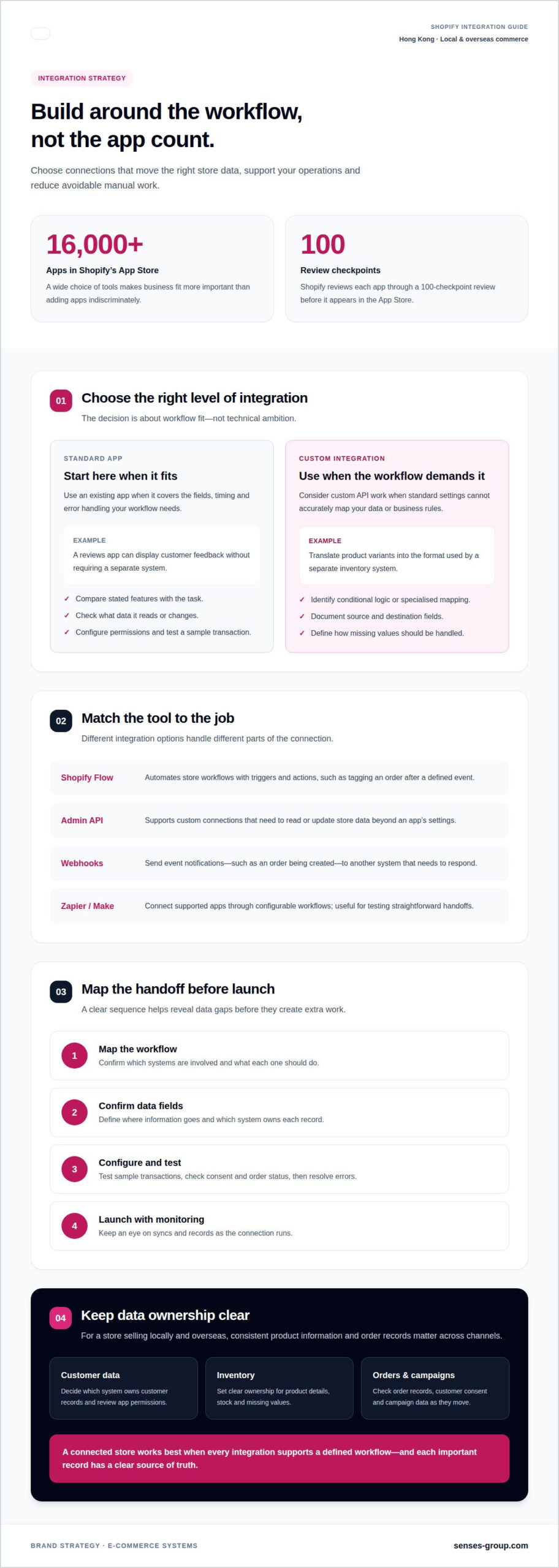
More apps don’t automatically make a stronger Shopify store. Shopify app integration services connect your store with apps and APIs, align the data and workflows they share, and provide upkeep as those connections change. Shopify’s App Store has over 16,000 apps, so choosing and integrating tools around your business needs matters more than adding them indiscriminately.
It’s understandable to expect an app to work as soon as it’s installed. But when inventory, orders, customer data or marketing activity need to move between systems, the integration design affects whether your setup supports growth or creates extra manual work. For SMEs and startups across Hong Kong SAR China selling locally and overseas, that distinction can shape how confidently the business scales.
This guide explains what Shopify app integrations cover, when a standard app is enough and when custom API work may be needed. It also covers maintenance, API updates, useful integration tools and practical criteria for assessing an approach, so you can build a connected store around the way your business operates.
Key Takeaways
- Map how marketing, social and sales channels should share data before adding more tools.
- Use an off-the-shelf app for standard workflows; consider custom integration when your processes or data requirements call for more control.
- Plan ongoing maintenance around sync monitoring, record reconciliation and Shopify API version changes.
- Align inventory, shipping and fulfilment workflows so operational handoffs support both local and overseas sales.
- Assess an integration approach by how well it fits your store’s systems, growth priorities and customer experience.
What Are Shopify Integration Services?
Shopify integration services connect your store with marketing, communication and sales platforms. They define what information moves, where it goes and what should happen next. For example, a completed Shopify order can update inventory, trigger a Klaviyo email and feed campaign reporting. Shopify’s App Store has over 16,000 apps, giving merchants tools to extend their stores. Shopify reviews each app through a 100-checkpoint review before it appears in the App Store.
The value comes from connected workflows, not app count. A social post can attract a customer, a sales channel can record the purchase, and an email platform can support a later campaign. Shopify app integration services help align those steps with your customer journey, product data and reporting needs. For a Hong Kong retailer selling through its own store and overseas marketplaces, consistent product information and order records matter across each channel.
- Meta: Shopify’s Facebook and Instagram sales channel connects product catalogues with social selling and campaign activity.
- Google: The Google and YouTube channel helps manage product visibility across Google surfaces and link advertising activity to store products.
- Klaviyo: This platform supports email and SMS marketing flows using Shopify customer and order events.
- Amazon: A marketplace connection can coordinate product listings and orders between Shopify and Amazon, where the integration supports the merchant’s workflow.
Each platform serves a different role. Meta and Google support discovery and advertising. Klaviyo can turn customer actions into relevant follow-up, such as a post-purchase message. Marketplace integrations can centralise channel activity, but product details, stock and order statuses still need clear ownership. Decide which system is authoritative for each record before enabling synchronisation.
How much do Shopify app integration services cost in Hong Kong? Pricing depends on the project and is provided after a quote request. Scope, the number of systems, data complexity and custom API work all shape the project.
What information and access should you prepare? Gather your Shopify store details, the platforms involved, workflow requirements, sample product and order records, and the business accounts needed for setup. Define which system owns customer, inventory and campaign data.
What are the steps and typical timeline? Start by mapping the workflow and confirming data fields. Then configure the app or API connection, test sample transactions, resolve errors and launch with monitoring. The timeline depends on the number of systems and the complexity of data mapping.
What security, privacy and data-protection risks should you consider? Review each app’s access permissions and limit them to the necessary store data. Protect account credentials, control staff access, test data flows and remove permissions when an integration is retired. Take particular care with customer details and order records across Shopify, marketing platforms and marketplaces.
Over 70% of thriving Shopify stores reportedly experience a significant uplift in sales and smoother operations after integrating third-party apps. Treat this as a reason to assess whether each connection supports your own workflows, rather than as a promise of a particular outcome. Prioritise integrations that address clear operational needs and keep their results aligned with your store’s goals.
App installation versus custom integration
A Shopify app is usually the practical starting point when its workflow matches your needs. Install it, grant permissions and configure its settings. For example, a reviews app can display customer feedback without requiring a separate system. Custom integration may be appropriate when standard settings cannot accurately map your products, orders or business rules. The decision is about fit, not technical ambition.
Start with the Shopify App Store and compare each app’s stated features with the task you need done. Check what data it reads or changes, which Shopify records it uses and how it handles exceptions. A marketing app that syncs customer segments may suit a simple campaign, but not a workflow relying on several customer tags and a separate approval step.
Tools have distinct roles in this decision:
- Shopify Flow automates store workflows using triggers and actions, such as tagging an order after a defined event.
- Shopify Admin API supports custom connections that need to read or update store data beyond an app’s settings.
- Webhooks send event notifications, such as an order being created, to another system that needs to respond.
- Zapier and Make connect supported apps through configurable workflows, useful for testing straightforward handoffs.
Choose an existing app when it covers the required fields, timing and error handling. A small retailer connecting Shopify orders to a supported email platform may need only account authorisation and configuration. Test the result with a sample order. Confirm that customer consent, order status and key product details appear as expected in the destination system.
Consider custom work when an integration requires conditional logic, specialised data mapping or a system without a suitable connector. For example, a business may need to translate product variants into a separate inventory system’s format. Document the source field, destination field and rule for missing values before development begins. That map reduces ambiguity during testing and future changes.
Before choosing either route, list the business outcome, systems involved, required data and response to failures. Then compare that list with app capabilities. If the app handles the complete workflow, avoid custom code that adds maintenance. If it does not, define a focused API integration instead of rebuilding functions already available in Shopify.
For businesses shaping a connected storefront around specific customer journeys, Shopify store planning can help align the commerce experience with the underlying workflow.
Integration maintenance and API updates
A Shopify connection needs ongoing oversight after launch. A payment, inventory or marketing sync can fail when credentials expire, fields change or a destination system rejects a record. For example, an order may appear in Shopify but fail to update the customer record elsewhere. Monitoring should catch that break before it distorts reporting or customer follow-up.
Shopify releases a new API version every three months at the beginning of each quarter. Shopify supports each stable API version for a minimum of 12 months, with at least nine months of overlap between consecutive stable API versions. That overlap gives merchants time to assess and update integrations before an older version is retired. Track the version used by each custom connection and schedule compatibility work around Shopify’s release cycle.
Financial data needs a separate control routine. Schedule Shopify financial-system synchronisation at daily or hourly intervals, depending on how quickly the business needs current records. Monitor synchronisation logs for errors and reconcile records monthly. Compare order totals, refunds and transaction statuses between Shopify and the finance system, then investigate differences instead of changing totals without tracing their source.
How can I test, monitor and troubleshoot Shopify app integrations? Run sample orders, refunds and inventory changes, then confirm each expected result in the connected system. Monitor Shopify and integration logs for failed events, expired credentials and rejected fields. Use a test environment where available before changing a live workflow.
Use tools for specific maintenance tasks:
- Shopify Admin helps review installed apps and their granted permissions.
- Shopify Flow can automate supported store actions, such as tagging an order after a defined event.
- Postman helps developers send API requests and inspect responses during troubleshooting.
- Google Sheets can support a monthly reconciliation by comparing exported order or transaction records.
When an error appears, trace the event from its origin. Check whether Shopify recorded the order, whether the integration received it and whether the destination accepted its fields. A missing customer tag, for example, may result from a changed mapping rather than a failed order sync. Record the cause, correction and retest result so the same issue is easier to resolve later.
Keep an integration register listing each app or API, its purpose, the data exchanged, its owner and its current version. Before an API update, review affected fields and test key workflows, including orders, refunds and customer updates. After deployment, check logs and sample records again. This makes maintenance a repeatable operating process rather than a response to disruption.
Inventory, shipping and fulfilment integrations
Inventory connections coordinate product availability across Shopify and other selling systems. Set one system as the source of truth, then define which fields move. For example, Shopify may send order quantities to an inventory platform, while that platform returns updated stock. Map product identifiers, variants and locations carefully. A mismatch between a Shopify variant and an ERP item can create inaccurate availability or duplicate records.
Shipping integrations carry order details into label, tracking and fulfilment workflows. Shopify Shipping can support eligible shipping tasks within Shopify. ShipStation can help manage shipping workflows across supported sales channels. An ERP such as NetSuite can connect inventory, purchasing and order records. Xero or QuickBooks can receive sales and accounting information, while a CRM such as HubSpot can organise customer records. The right connection depends on the systems already in use and which data each must own.
Which Shopify apps and systems can be integrated, such as ERP, CRM, accounting, and logistics? Shopify can connect with supported ERP, CRM, accounting and logistics tools, including NetSuite, HubSpot, Xero, QuickBooks and ShipStation. Integrations map records such as products, customers, orders, payments and tracking updates between the chosen systems.
How do Shopify integrations handle Hong Kong payments, currencies, tax and shipping? They pass configured payment statuses, currency values, tax fields and shipping details between Shopify and connected systems. Define how HKD and any overseas selling currencies are recorded, and keep tax and delivery settings consistent with your checkout and accounting workflows.
For a Hong Kong merchant shipping locally and overseas, design the handoff around actual order states. An order may move from paid to packed, dispatched and delivered. Decide which system updates each state, then test a sample order and its tracking details. If the shipping platform returns a tracking reference, confirm where Shopify displays it and which customer message uses it.
- Shopify inventory: Useful for managing stock directly in the store.
- NetSuite: Can connect commerce records with broader business operations.
- Xero and QuickBooks: Can support accounting workflows for sales and transaction records.
- ShipStation: Can organise supported order and shipping workflows across channels.
Before activation, agree on stock ownership, fulfilment triggers and exception handling. For example, decide what happens when an order contains a back-ordered item or a carrier update fails to return. Test edits, cancellations and partial fulfilments, not just a standard paid order. Clear rules help prevent conflicting stock counts and give customers more consistent order information across local and overseas channels.
Choosing an integration provider
In Hong Kong, Shopify integration support can cover app setup, workflow configuration, API connections, data mapping and ongoing maintenance. Some projects connect a single app; others link Shopify with inventory, accounting or customer systems. Match the work to the actual bottleneck. A store needing order data in Xero has different requirements from one syncing product availability across several channels.
Start by defining the result and the systems involved. Write down what should happen when a customer places an order, requests a refund or changes an address. For example, specify whether Shopify or your inventory system controls stock. This gives a provider a concrete workflow to map, test and document, rather than a vague request to “connect the systems.”
What Shopify app integration services are available in Hong Kong? Services can include configuring existing Shopify apps, connecting supported platforms, building custom API workflows, mapping data and maintaining integrations. The right scope depends on your systems, data requirements and the process you need to improve.
Assess the proposed approach against these practical criteria:
- Workflow fit: Ask for a clear map showing Shopify events, data fields and destination actions.
- Technical method: Confirm whether the project uses an existing app, Shopify Flow or a custom API connection.
- Testing: Expect sample cases for orders, refunds, product updates and failed data transfers.
- Ownership: Identify who manages app permissions, credentials and integration documentation.
- Maintenance: Set out how Shopify API changes, error logs and future workflow adjustments will be handled.
A useful assessment follows a real transaction. Trace a test order from Shopify into the connected system, then check the customer record, product details and order status. If the workflow includes a refund, test that separately. Tools such as Postman help inspect API requests and responses; Shopify Flow can automate supported store actions without custom code.
Look for a provider who explains trade-offs in business terms. An app may be simpler to maintain, while a custom connection may better suit distinctive data rules. The proposal should identify the systems, fields, exception handling and testing responsibilities. For a Hong Kong SME preparing to sell overseas, also map currency and fulfilment data across the store and destination platforms.
Use the Shopify Partner Directory to explore Shopify-focused expertise, then assess each proposed plan against your workflow. A short project brief with system names, desired outcomes and sample records makes scope clearer. To shape the storefront and its connected customer journey, plan your Shopify store integration around the way your business sells.
Senses Group: Brand Strategy
Senses Group helps businesses align brand direction with their Shopify customer experience. Its Brand Strategy and Brand Identity Design services can help position your business and create a visual system to support growth in local and overseas markets. An Ecommerce Shopify Store brings that direction into the buying journey, while Klaviyo Email Automation supports customer communication after key store actions.
The next step is to connect your commercial goal to the store experience: clarify who you serve, how you want to be recognised and which customer workflows matter. That foundation helps guide decisions about apps and data flows without treating technology as a substitute for strategy.
Visit senses-group.com to discuss your brand and ecommerce priorities.
Build the next stage around a clear commercial goal
Begin your next integration decision with the customer or business outcome you want to improve. Choose one friction point, such as inconsistent product information or disconnected post-purchase communication, then define how a better workflow should support your store. That focus keeps technology decisions tied to growth instead of adding tools without a clear role.
Shopify app integration services work best as part of a coherent commerce experience. Senses Group can connect Brand Strategy and Brand Identity Design with an Ecommerce Shopify Store, helping Hong Kong businesses bring their market position and online customer journey into closer alignment. The aim is a store system that supports how your business wants to be understood as it expands into local and overseas markets.
If you’re ready to shape that next step, contact Senses Group about integrations. A clear direction can turn connected systems into a stronger foundation for growth.
Frequently Asked Questions
How Does Automation Through Integrations Enhance Efficiency and Scalability?
Automation reduces repeated manual handling by moving information between connected systems. For example, a completed Shopify order can trigger an internal task, update a customer record and start a relevant follow-up sequence. As order volume grows, consistent workflows help teams spend less time copying data and more time resolving exceptions. Shopify app integration services are most useful when each automated action has a defined owner and clear business purpose.
Which Shopify integration agencies or developers in Hong Kong have strong reviews and case studies?
Senses Group is a Hong Kong-based option for businesses connecting brand direction with Shopify commerce. Its documented Monchhichi Jewelry Atelier case describes a rebuilt ecommerce experience integrating email automation, with revenue doubling shortly after launch. That example demonstrates ecommerce and marketing work, not a blanket claim about every integration project. Assess relevance by comparing a case’s business challenge, systems involved and documented outcome with your own project needs.
How do I choose between a Shopify app, custom integration, and middleware?
Choose a Shopify app for a standard workflow its settings already support. Use custom integration when your business needs specific data rules or system behaviour an app cannot handle. Middleware such as Zapier or Make can connect supported platforms through configurable steps, which can suit simpler cross-app processes. For example, route a Shopify order notification into a task tool through middleware, but consider custom work for complex inventory rules across several systems.